







 Blog
 Free tools
 Help center





WISMO is short for "where is my order". It's the message a customer sends after paying, when they can't tell where the parcel is or when it will arrive.
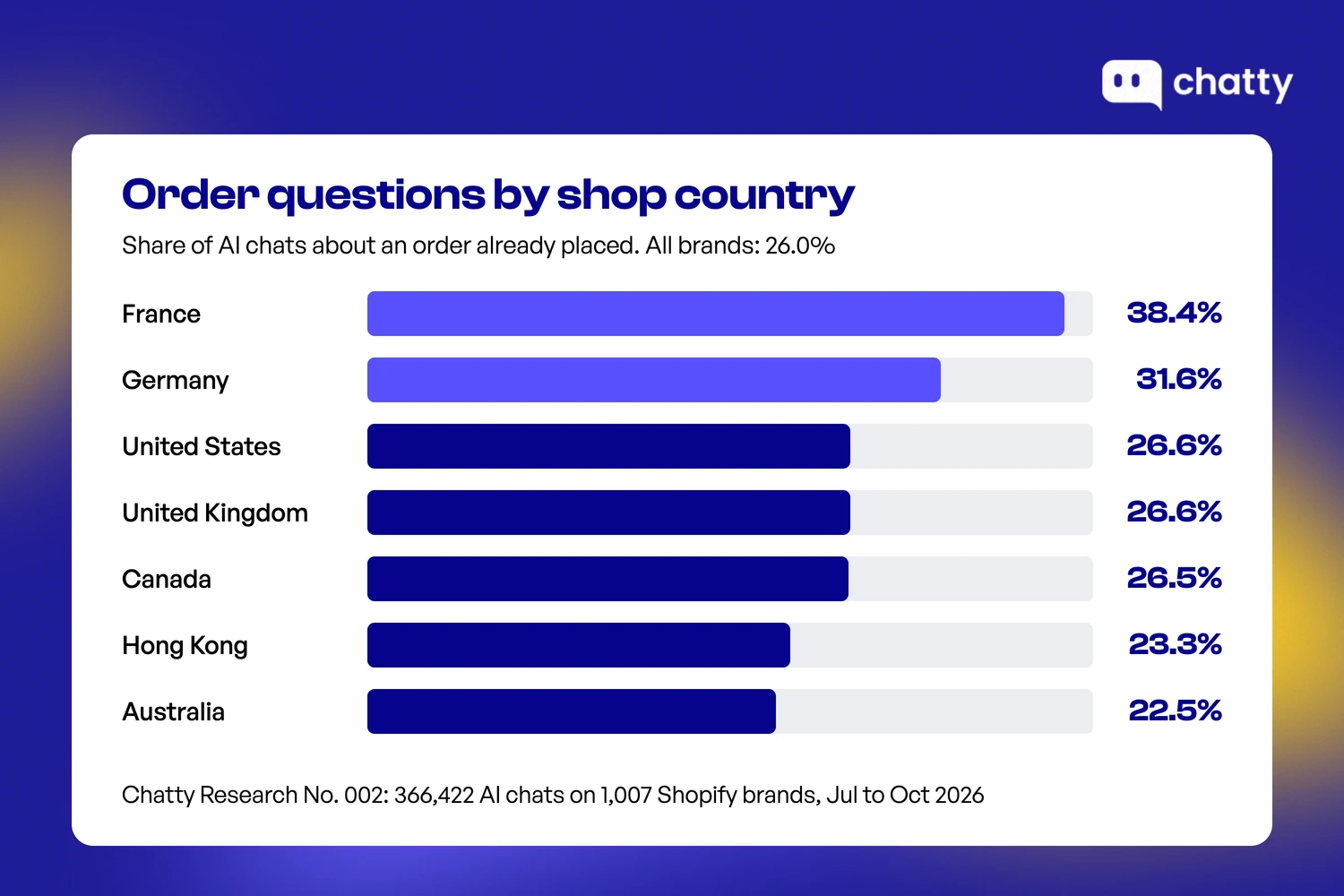
It's also one of the most common messages in ecommerce customer service. Chatty's study looked at 366,422 AI chat conversations on Shopify brands from July to October 2026. About a quarter of them, 26.0%, were about an order already placed.
Many stores buy a tracking app and expect WISMO to go away. But "where is my order" is really five different questions. A customer who paid yesterday needs a ship date, while a customer staring at a "delivered" parcel that isn't there needs a person.
You can stop three of the five before the customer writes. The other two need someone on your team.
- Sort last month's tickets into five types
If you don't know your numbers yet, tag last month's tickets by type before changing anything. The type with the most tickets is the one to fix first.
- Show "ships in X days" before payment
If most WISMO comes before shipping, add it to product pages, checkout and the confirmation email. It's the cheapest of the six ways.
- Open your tracking link on your phone
If you send tracking emails and still get tickets, check that all four shipping updates go out. Then tap the link and look for a real update and a date.
- Email late customers a new date first
If orders run late, email a new date on the day the order misses it, before they ask.
- Let customers check orders in chat at night
If order questions come in after hours, add order tracking to the chat on your site. Customers get the status without waiting for your team.
- Give missing parcels to one person
If a parcel says delivered but never arrived, give it to one person with the order details ready. A template can say "we're on it", but a person has to fix it.
What is WISMO?
WISMO is any message from a customer who has paid and is still waiting, asking where the order is or when it will arrive. It might be an email: "It's been 6 days, where is my order #1042?" Or a chat at 11pm that just says "any update??"
The words change every time. The situation stays the same: your customer has paid and can't see what happens next.
A shipping question from someone who hasn't bought yet doesn't count. "How long does delivery to Canada take?" is a question for your product page and shipping policy, not your order emails.
You'll also hear WISMR, short for "where is my refund". It's the same worry after a return, but your returns process fixes it, so count it on its own. To tag a ticket, ask whether the customer has paid and what they're waiting for:
| Ticket type | Example message | Has the customer paid? | Where you fix it |
|---|---|---|---|
| WISMO | "It's been 6 days. Where is my order #1042?" | Yes | Shipping emails, order status page, delay emails |
| WISMR | "I sent the jacket back two weeks ago. Where is my refund?" | Yes, and sent the item back | Returns policy, refund emails |
| Shipping question before buying | "How long does delivery to Canada take?" | No | Product page, checkout, shipping policy |
How much WISMO is normal?
In a typical store's chat, WISMO makes up roughly 14% to 26% of conversations. Both numbers come from Chatty Research No. 002. That study followed 366,422 conversations with Chatty, the AI sales agent, on 1,007 Shopify brands from July to October 2026.
So why a range rather than one number? The 26.0% counts every question about an order already placed, including returns and warranty claims. That's more than WISMO alone.
The 14.2% counts only questions about orders and accounts, which is narrower. Your WISMO most likely sits between the two.

Where you sell changes the number too. French brands had 38.4% of their chats about an existing order. Australian brands had 22.5%.
So compare yourself with stores that ship to the same countries you do.
A lot of these messages also arrive when your team is offline. In the same study, 61.3% of all conversations started outside weekday business hours, meaning 9:00 to 17:00 in the shop's country.
That figure covers every topic, not only orders. Still, it means a good part of your WISMO probably lands while nobody can reply.
Now check your own store. Take one month and count three things: orders shipped, all tickets, and WISMO tickets. Then work out two rates:
| Rate | Formula | What it tells you |
|---|---|---|
| % of tickets that are WISMO | WISMO tickets ÷ all tickets × 100 | How much of your support time goes to order questions |
| WISMO per 100 orders | WISMO tickets ÷ orders shipped × 100 | How often an order makes someone ask, no matter what else is in the inbox |
Say you shipped 2,000 orders last month and got 620 tickets. Of those, 170 were WISMO. So 27% of your tickets were WISMO, or 8.5 for every 100 orders.
Use the 27% to compare yourself with the 14% to 26% range. Track the per-100-orders number from month to month.
Why both? A busy month of product questions can make the percentage fall even when WISMO hasn't changed. The per-100-orders number doesn't have that problem.
Why customers ask "where is my order": the 5 WISMO types
Picture two customers. One paid yesterday and wants to know when the order ships. The other has a parcel marked "delivered" that never showed up.
Both write "where is my order?", but you can't fix them the same way. There are five versions of this question, and which one you get depends on where the order is when the customer writes.
Your WISMO total tells you how big the problem is. To know what to fix, sort those tickets into five types.
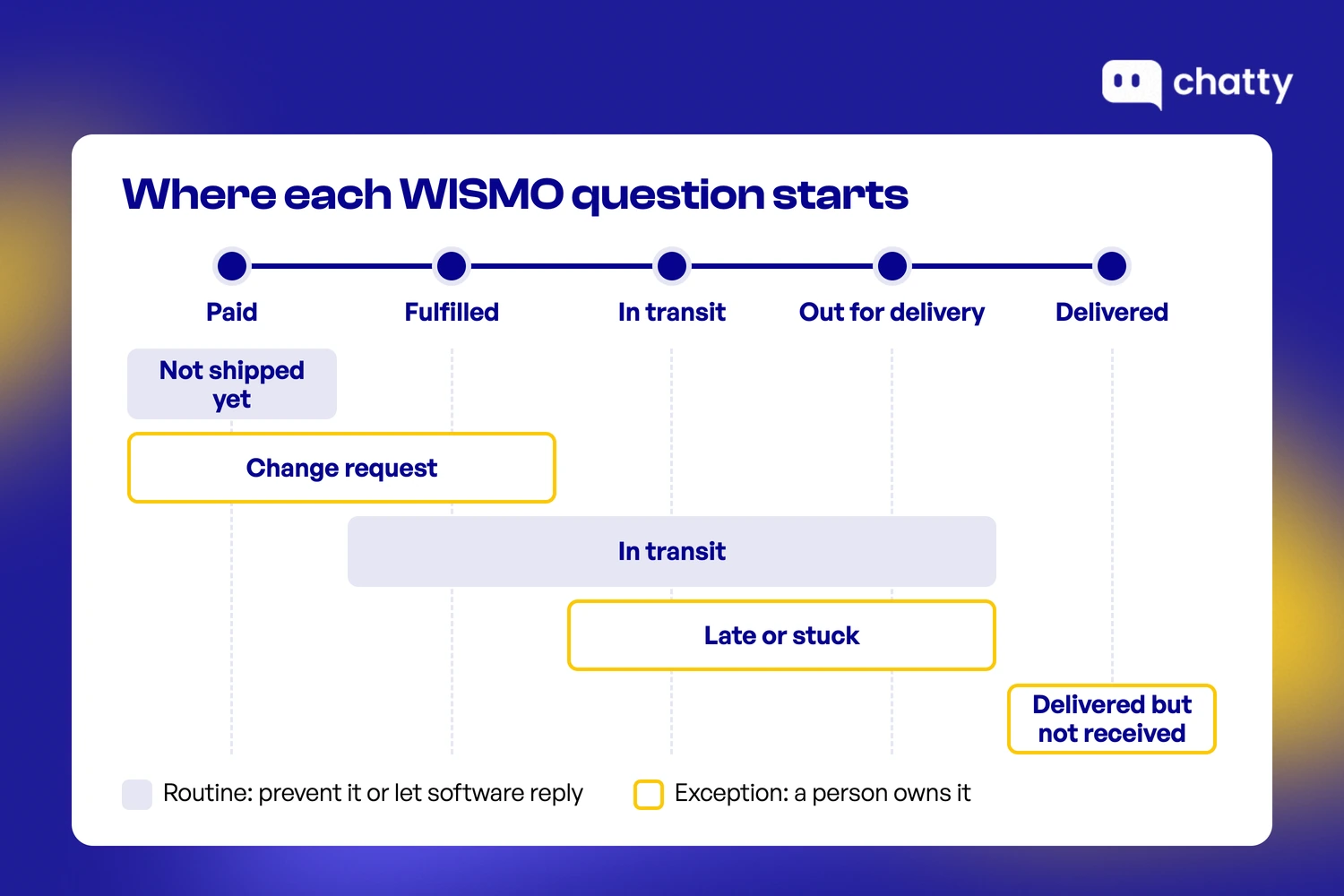
Each type matches where the order is when your customer writes, from payment to the doorstep:
| WISMO type | Where the order is | What the customer writes | Who should reply |
|---|---|---|---|
| Not shipped yet | Paid, not sent yet | "I ordered 3 days ago and still have no tracking." | A template or an AI |
| In transit | Sent and on time | "Where is my parcel now? When will it arrive?" | A template or an AI |
| Late or stuck | Past the promised date, or tracking hasn't updated in days | "Tracking hasn't moved since Tuesday." | A person, once it's past your promised date |
| Delivered but not received | The carrier says delivered | "It says delivered, but nothing is at my door." | A person |
| Change request | Before or just after it's sent | "Can I change the address on my order?" | A person |
Two of these types, orders not sent yet and parcels on the way, have one right answer for everyone. That answer is where the order is, the tracking link and the date it should arrive. Send it at the right moment and most of your customers never need to write.
If they still do, a template or an AI can reply.
The other three are harder: a late parcel, a "delivered" parcel that never arrived, or a new address. Each one needs someone to open the order, check tracking and sometimes your stock. A template can say "we're on it," but a person on your team has to fix it.
So why do customers write when they already have a tracking link? Usually the link doesn't help.
It shows "label created" for two days, opens a carrier page in another language, or gives no delivery date. Each of those turns an on-time parcel into a ticket.
6 ways to cut WISMO in your store
You can cut WISMO in six ways, and you don't have to do them in order. Each way stops a different type of question, so start with the type you get most.
Not sure which type that is? Open last month's tickets and give each order question one of five tags: wismo-not-shipped, wismo-in-transit, wismo-late, wismo-not-received or wismo-change. A helpdesk with tags makes this quick, and a spreadsheet with five columns works just as well.
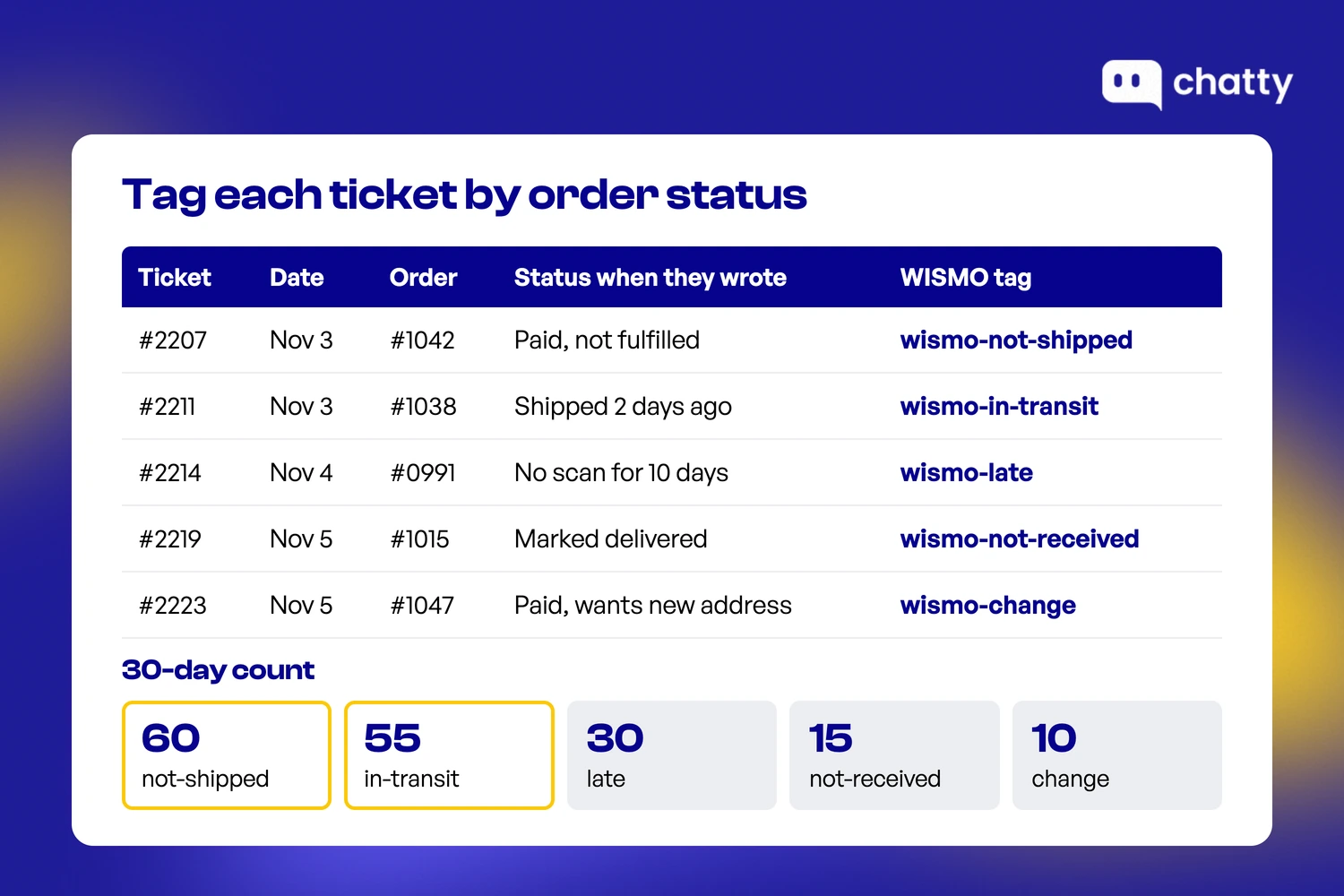
Tag by what the order shows, not by how upset the customer sounds. A polite "any update?" on a parcel whose tracking hasn't changed in 10 days goes under wismo-late.
Every way works on any store platform, with a helpdesk or a plain shared inbox. Your biggest tag points to the way to try first:
| Way | Questions it cuts | Effort | Proof it works |
|---|---|---|---|
| 1. Delivery date before payment | Not shipped yet | Low | Shoppers in Baymard's tests read a shown date as a promise |
| 2. Four shipping updates, tested link | Parcels on the way | Low | Narvar client Newell Brands: 20% fewer WISMO tickets |
| 3. Delay email with a new date | Late or stuck | Medium, a daily check | 45% of shoppers want updates before they ask (Narvar) |
| 4. Order status page and "Track my order" link | Not shipped yet, on the way | Low | Baymard: shoppers leave for carrier sites when details are missing |
| 5. Order check in chat, at any hour | Not shipped yet, on the way | Low | Chatty: 92.3% of order chats closed without handing off |
| 6. One person for the hard cases | Late, delivered but not received, changes | Medium | No published number; it speeds the replies that decide refunds |
Ways 1, 2, 4 and 5 are one-time setups on your pages, emails or chat. Ways 3 and 6 need someone every day, so start there only if late or missing parcels top your tags.
1. Show the delivery date before customers pay
A customer orders on Monday night and expects tracking by Tuesday. Your warehouse needs three days to pack it. By Wednesday, they're writing to you.
Fix the mismatch before they pay. Add one line under the price or the add-to-cart button: how long you take to send the order, and how long delivery takes. For preorders and made-to-order items, show the actual date, like "Ships from 12 January."
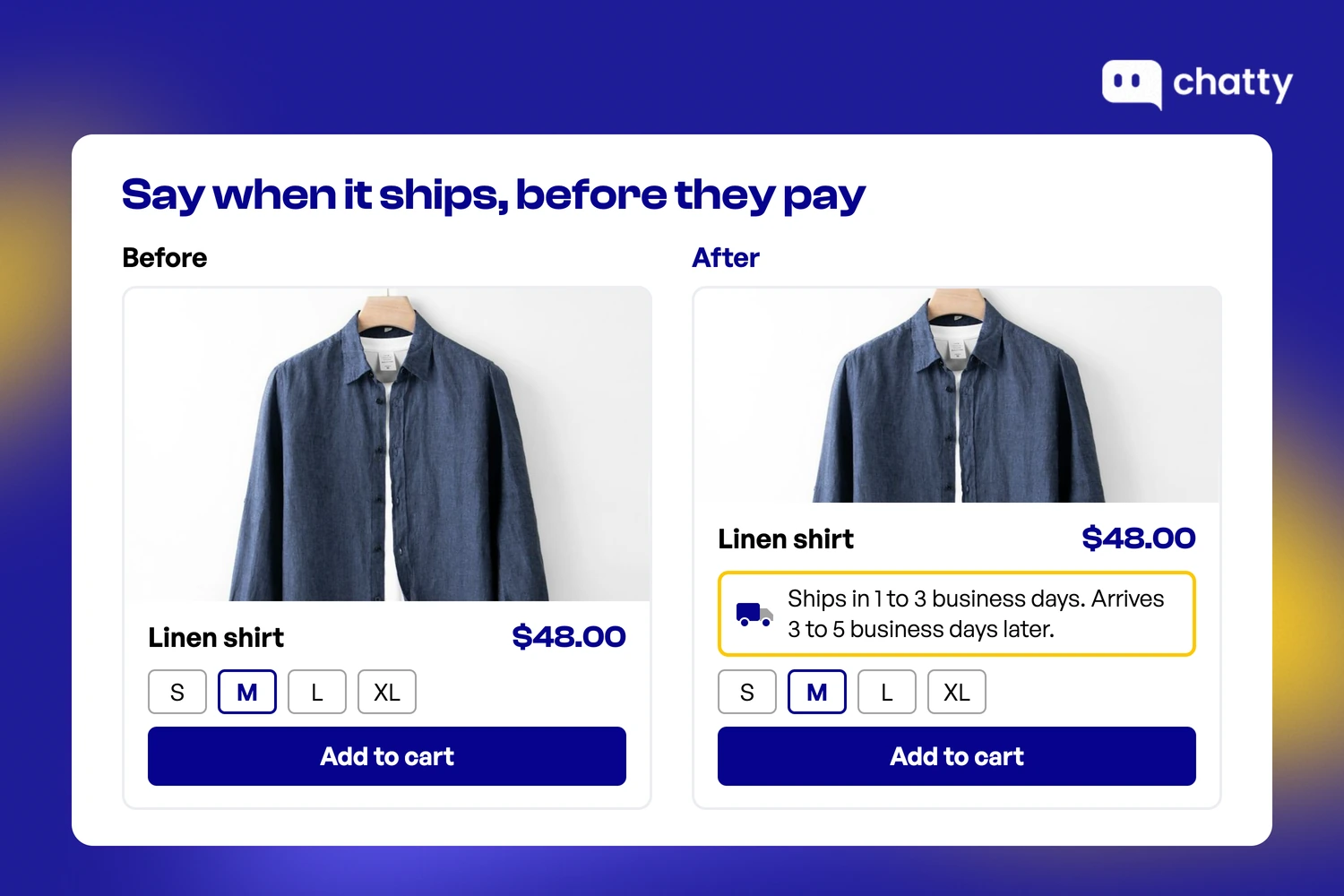
Then repeat the same promise in the two places customers see after the product page:
- At checkout, next to each shipping option: "Standard shipping, $5.99" becomes "Standard shipping, $5.99. Arrives 3 to 5 business days after dispatch."
- In the order confirmation email, near the top: "Thanks for your order!" becomes "Thanks for your order! It ships by [ship date], and we'll email tracking as soon as it leaves us."
A customer with a date has no reason to ask before that date. In Baymard's checkout tests, shoppers shown only "3 to 5 business days" stopped to count the days, and some opened a calendar. The same tests found that shoppers read a date on the page as a promise.
Shoppers also look for that date before they buy. Narvar's 2025 survey asked 3,461 US online shoppers about delivery. Of those, 73% said estimated delivery dates influence what they buy.
This way cuts "not shipped yet" tickets. They only drop for orders placed after the change, so give it two weeks before you judge it.
2. Send four shipping updates and tap your own tracking link
Your customer got a "shipped" email on Monday. It's Thursday and nothing has come since, so they write.
Send one update for each moment a customer would otherwise ask: shipped, tracking update, out for delivery and delivered. Most store platforms and tracking apps can send all four. Out for delivery and delivered depend on updates from your carrier, so check which ones your setup really sends.
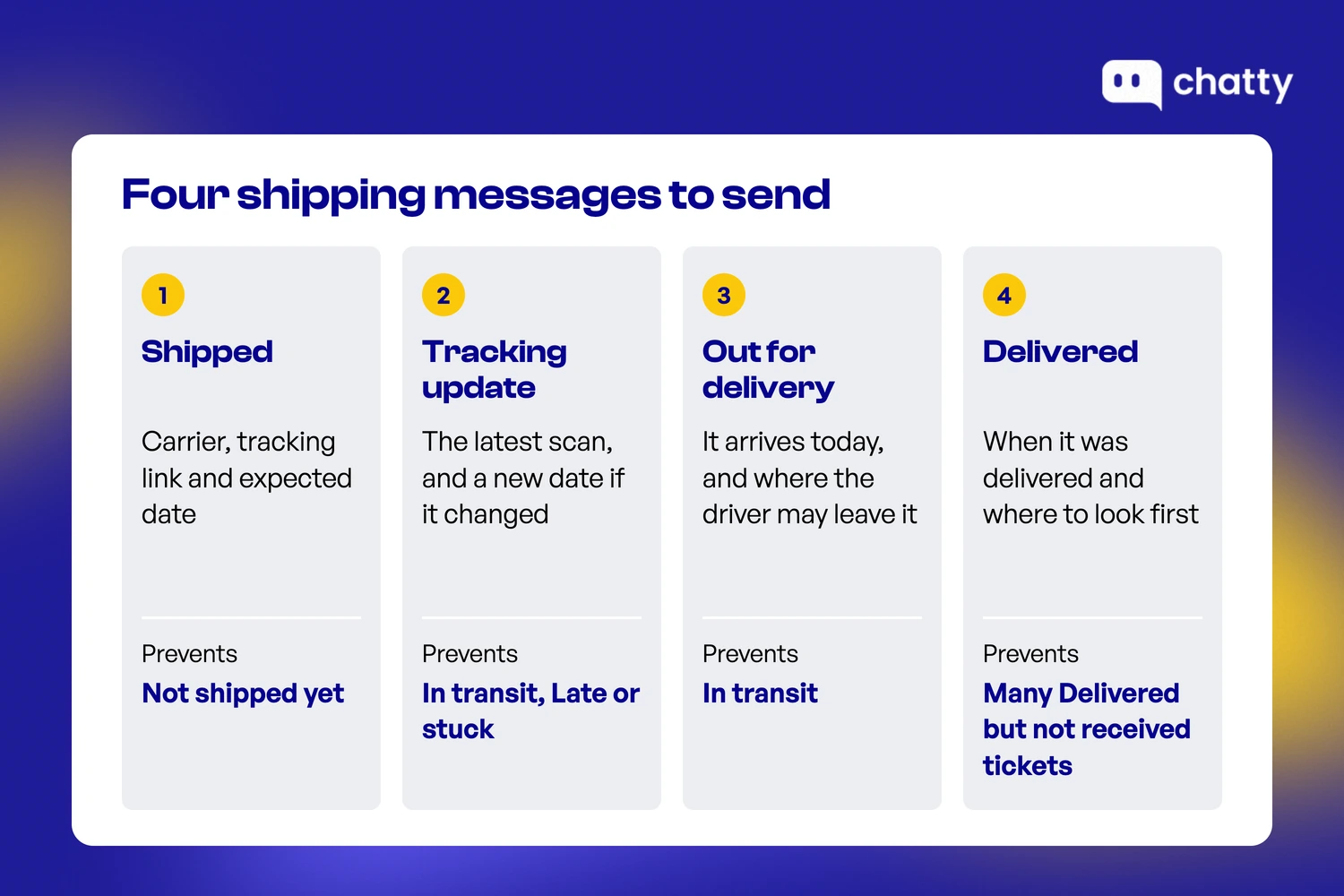
A new tracking link often shows nothing but "label created" for a day or two. One extra line in the shipping email tells the customer that's normal:
| Shipping email before | Shipping email after |
|---|---|
| "Your order has shipped! Track it here: [tracking link]" | "Your order has shipped! Track it here: [tracking link]. Tracking can show 'label created' for up to 2 days until [carrier] picks up your parcel." |
Then test the link the way your customer would. Place a real order, open the shipping email on your phone and tap the link. The page should load in your customer's language, show at least one tracking update and give a delivery date.
The published WISMO numbers for shipping updates come from vendors. Narvar reports that its client Newell Brands averages 20% fewer WISMO tickets across more than 80 brands. Treat that as a direction, not a promise for your store.
This way cuts questions about parcels on the way. Watch the ones sent in the first two days after the order leaves, because those point to the "label created" problem.
3. Email late customers a new date before they ask
Order #1042 was due on Friday. It's Saturday morning, and tracking hasn't moved since Tuesday.
Write to that customer first, on the day the order misses its date. One person can find these orders in a short check each morning, by looking for two groups:
- Orders you haven't sent that are older than your packing time. Your orders list shows them.
- Sent orders whose tracking hasn't changed in four days. Your carrier or tracking app shows them.
Each of those customers gets an email with a new date and a clear choice if the parcel still hasn't moved.
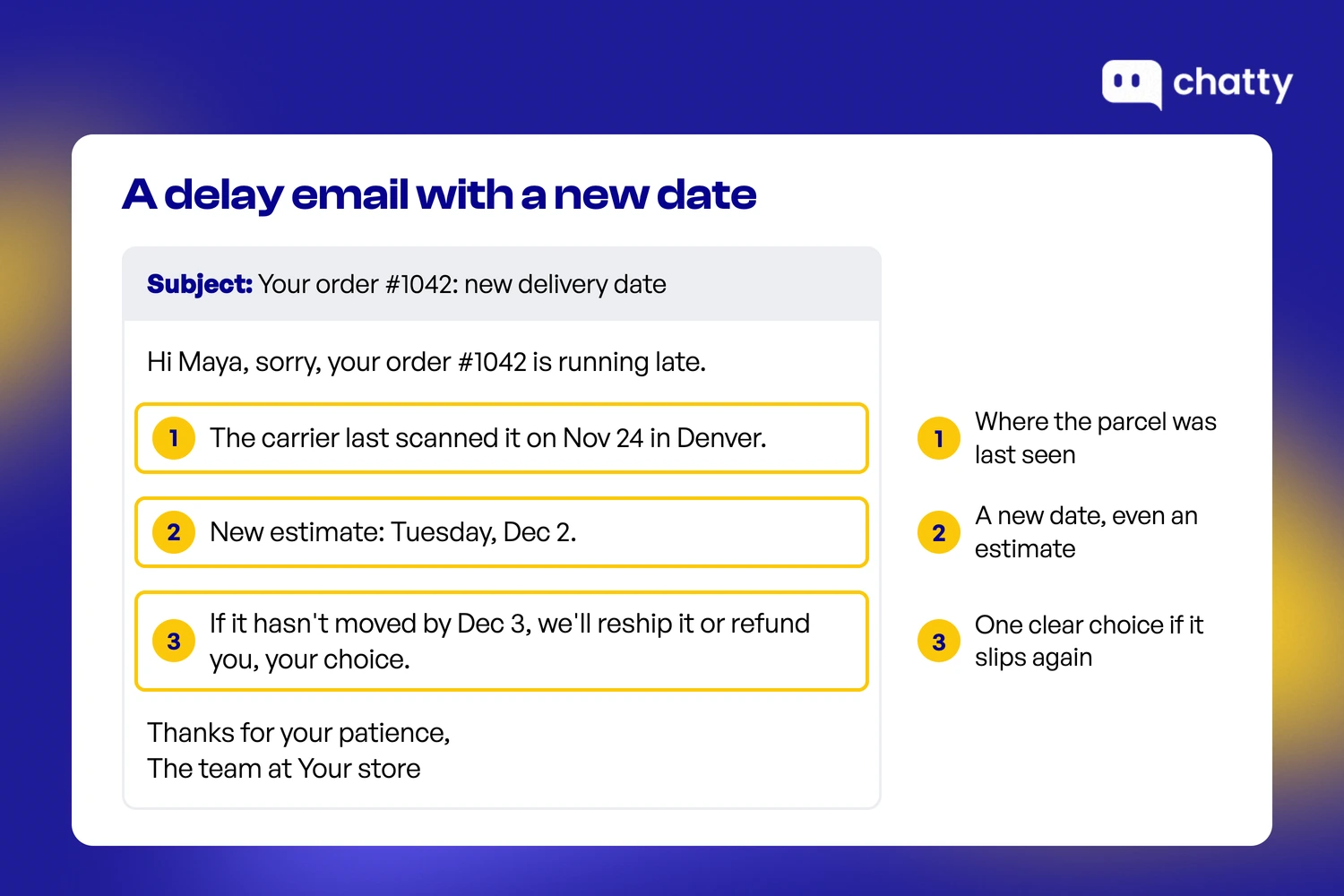
The new date is what stops your customer from writing again. "Your order is delayed" with no date only earns you a "so when?" reply. Give an estimate even if you're unsure, and say when you'll update next.
Customers want this email before they have to chase you. In Narvar's 2025 survey, 45% of shoppers said that when something goes wrong, they want real-time updates before they ask.
They also open it. In Narvar's notification programs, delay emails average 38% click-through. Delivered emails average only 8%.
This way cuts late-order tickets. If those go up after you start, your check runs too late. Look for orders with no tracking update after three days instead of four.
4. Put an order status page and a "Track my order" link where customers look
Some customers delete the shipping email, and others never open it. When they want an update, they come back to your site and look there.
Give them two things to find:
- An order status page with six details: delivery date, progress bar, carrier, linked tracking number, shipping history and what's in the parcel.
- A "Track my order" link in your header or footer menu that opens that page, or your tracking app's page.
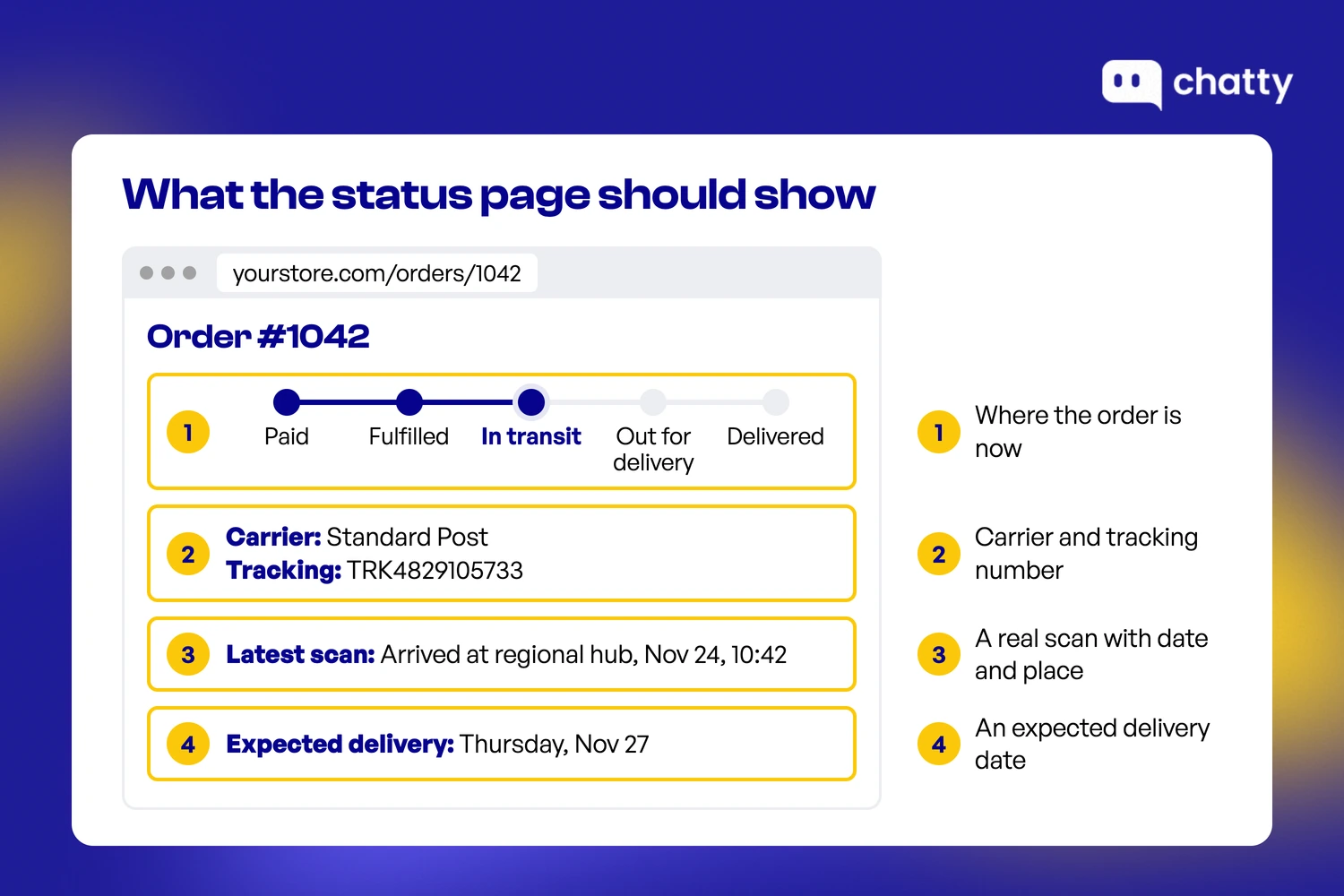
Those six details come from Baymard's order tracking research. In its testing, shoppers left for carrier sites mainly when the store didn't give them the full picture. Only 33% of the sites tested showed all six details, so a complete page is still rare.
This way cuts questions about orders not sent yet and parcels on the way, from customers who lost or skipped the email.
5. Let customers check their order in chat, even at night
At 11pm a customer types "where's my order?" into the chat on your site. Nobody on your team will see it until morning.
Connect your chat to your orders, so it can find the order and reply with the status at any hour. Most chats in Chatty's study started outside weekday business hours, which is exactly when nobody can look the order up for them.
On a Shopify store, Chatty, the AI sales agent, finds the order in the chat at any hour. It has three order tracking tools, and each fits a different customer:
- The Order tracking skill is on by default. When a customer asks where the order is, the AI checks who they are, then sends the status and tracking link in the chat.
- The Order tracking block in the chatbox is for customers who'd rather look it up themselves. They enter an order number with an email or phone, or a tracking number.
- AI-powered tracking adds live carrier updates from 17Track. If the parcel hasn't arrived and the AI knows the customer's email, it offers to email them when the status changes.
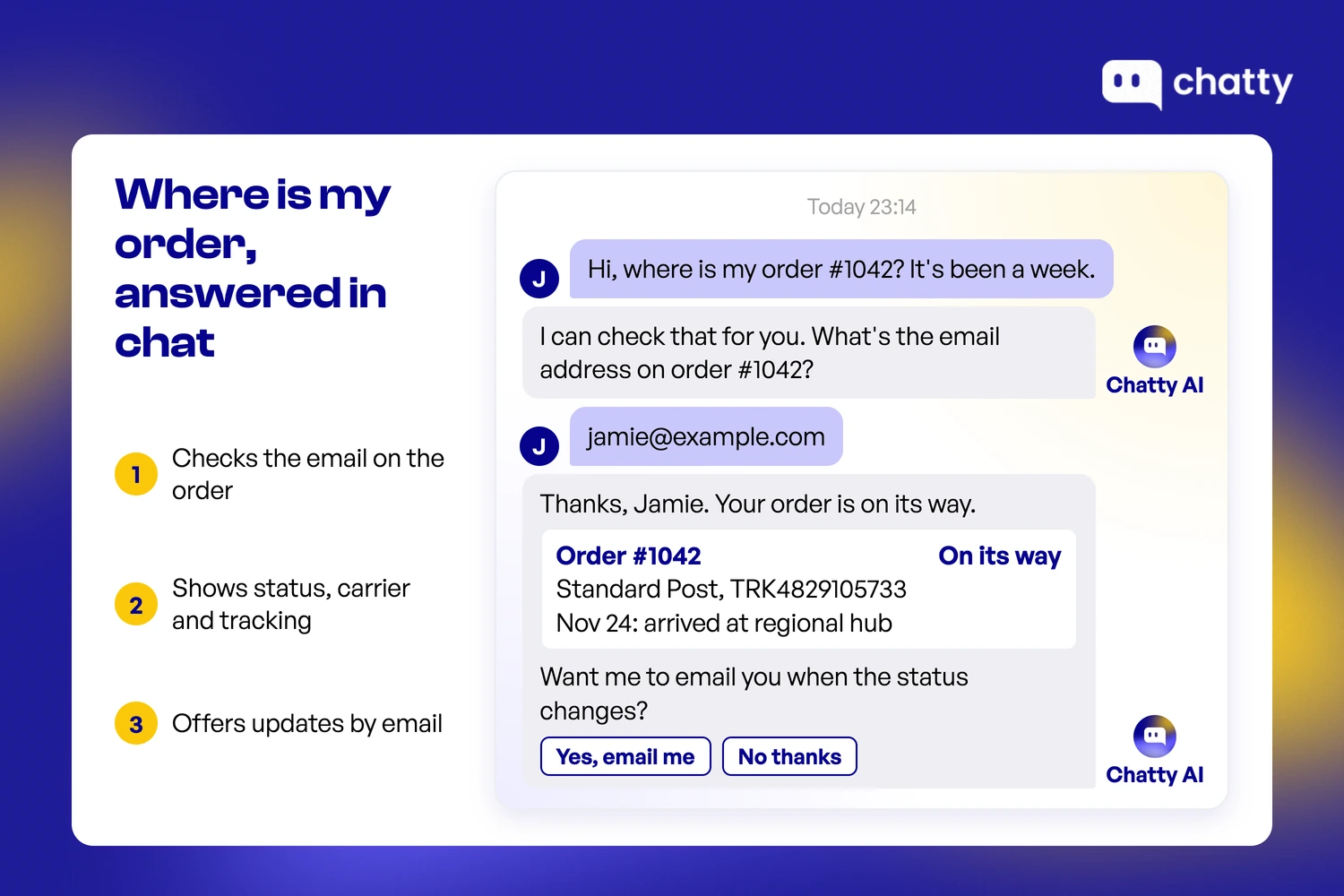
Order questions are some of the easiest for an AI to close, because the reply is already in the order. In April 2026, the median Chatty store closed 92.3% of order and account conversations without handing off to the team.
This way cuts questions about orders not sent yet and parcels on the way that arrive while your team is offline. To check it, count how many on-the-way tickets still reach a person in the month after you turn it on.
6. Give the hard cases to one person, with the order details ready
Some tickets need a decision, not a status update. Think of a late order the customer is still chasing, a parcel marked delivered that never arrived, or a request to change the address.
These aren't rare. In Narvar's 2026 holiday survey of 1,348 US shoppers, 23% had a parcel marked delivered that never arrived last peak.
Give all of these tickets to one person.
In a helpdesk, one rule can send the wismo-late, wismo-not-received and wismo-change tags to the same person. No helpdesk? One label in your shared inbox and one named person per shift do the same job.
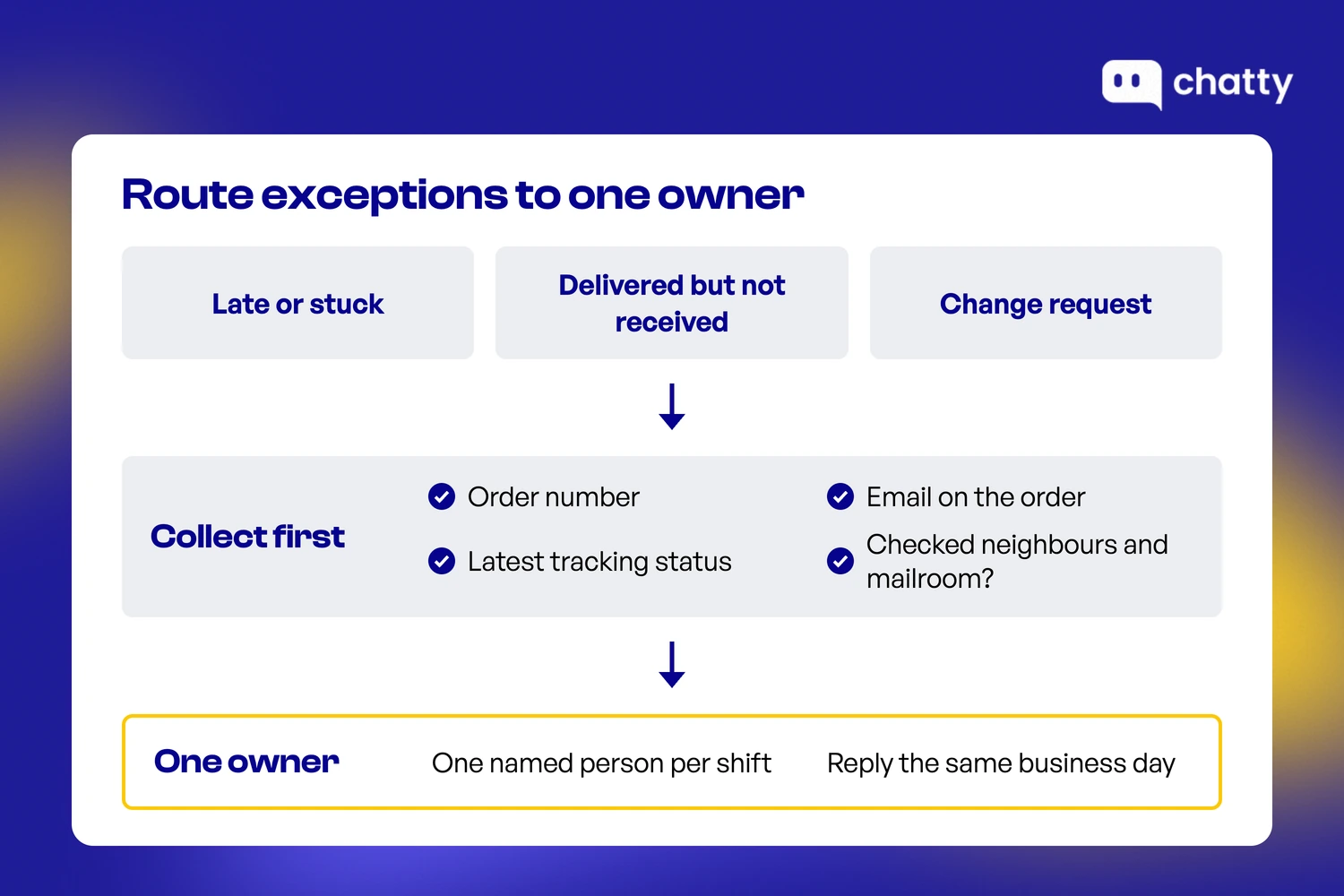
Before the ticket reaches that person, get what they'll need: the order number, the email on the order and the latest tracking status. For a parcel marked delivered, also ask whether the customer has checked with neighbours and the building's mailroom. Then the first reply can actually move things forward.
Promise these customers a faster reply than everyone else, for example the same business day instead of 24 hours. Ticket triage applies the same sorting to the rest of your inbox.
There's no published number for this way, so judge it by logic and by your own tickets. If nobody is in charge, these tickets go to whoever opens the inbox first, and the customer who has waited longest waits even longer. One person also sees patterns, such as one carrier losing parcels on one route, and can raise it with that carrier.
This way doesn't make these tickets disappear. Judge it by two signs: faster first replies on those three tags, and fewer of them ending in a refund or a reship.
On a Shopify store, Chatty follows the same rule. When a tracked order shows a failed delivery or a delivery problem, a setting called Delivery issue passes the chat to your team.
Your team then sees which order the customer is asking about, right in the chat. If nobody is online, the AI takes the customer's email, the problem and the order number, so someone can follow up.
Chatty stops there, and two limits decide whether it fits your store:
- Chatty only works if your store runs on Shopify, not on WooCommerce, BigCommerce or other platforms.
- Chatty finds the order but doesn't act on it, so refunds, cancellations, returns and lost-parcel claims stay with your team.
If most of your WISMO is parcels marked delivered that never arrived, or address changes, skip the chat tool for now. Those tickets need a person, and one person in charge of them will cut them more than any app.
"Where is my order" reply templates for each WISMO type
Even with all six ways in place, some customers will still write. Each type gets its own reply, and each one works in email or chat. The late-order reply doubles as the delay email from way 3.
Paste them into your helpdesk's saved replies or into the instructions for an AI agent. Words in [brackets] come from the order, so check that your tool can fill them in before you rely on it:
| When to send | Message to copy |
|---|---|
| Not shipped yet Paid, not sent yet | Hi [first name], your order [order number] is being packed and ships by [ship date]. You'll get tracking by email as soon as it leaves us. |
| In transit Sent and on time | Hi [first name], your order [order number] is on its way with [carrier]. Latest update: "[status]" on [date]. Expected delivery: [delivery date]. Track it here: [tracking link] |
| Late or stuck Past the promised date, or no tracking update for 4 days. Send it before they ask | Hi [first name], sorry, your order [order number] is running late. [Carrier] last updated it on [date] at [location]. New estimate: [new date]. If it hasn't moved by [date], we'll [reship it or refund you], your choice. |
| Delivered but not received The carrier says delivered | Hi [first name], sorry it hasn't turned up. [Carrier] marked order [order number] as delivered on [date] at [time]. Could you check with neighbours, your mailroom and any safe place? Still missing after 24 hours? Reply here and we'll take it up with the carrier. |
| Change request New address or a different item | Hi [first name], thanks for letting us know. Your change to order [order number] is with our team. We'll confirm within [time]. If the order has already left, we'll explain your options. |
Support emails that aren't about orders get their own set in our customer service email templates.
Example: a WISMO audit for a 2,000-order store (illustrative)
Say you run a store that ships 2,000 orders a month and gets 620 support tickets. This store is illustrative.
After a month of tagging, 170 tickets are WISMO. That's 27% of all tickets, or 8.5 for every 100 orders. The 170 tickets break down by type, and each type gets one fix:
| WISMO type | Tickets | Fix chosen | Way |
|---|---|---|---|
| Not shipped yet | 60 | Packing time on product pages and in the confirmation email | 1 |
| In transit | 55 | Turn on the out-for-delivery email and test the tracking link | 2 |
| Late or stuck | 30 | Delay email when an order passes its date | 3 |
| Delivered but not received | 15 | One person, with order details collected first | 6 |
| Change request | 10 | The same person | 6 |
| Total | 170 |
Start with "not shipped yet". It's the biggest type and the cheapest fix. Ways 1 to 3 go after 145 tickets, all from types you can stop before the customer writes.
The other 25 stay with a person, on purpose. A fast, careful reply on those decides whether your customer orders again.
After 30 days, you check three numbers to see which fixes worked:
- WISMO per 100 orders, which is the result that counts. If a sale brought in more orders, the percentage can look flat while this number falls.
- "Not shipped yet" tickets, which should fall first, because the packing time shows from the next order.
- Late-order tickets. If they went up, your morning check runs too late, so you move it a day earlier.
WISMO mistakes that create more tickets
You add the tracking emails, and the tickets keep coming. Usually one of four small mistakes is behind it, and each one shows up in your tags:
| Mistake | What you see in your tickets | Fix |
|---|---|---|
| Sending tracking before the carrier picks up the parcel | On-the-way tickets in the first two days, quoting "label created" | Add the "label created" line from way 2 under the tracking link |
| Delay emails with no new date | Late-order tickets right after the delay email goes out | Always give a new date, even an estimate, and say when you'll update next |
| Watching only the % of tickets that are WISMO | The percentage stays flat while orders grow, so you can't tell if anything worked | Track WISMO per 100 orders too |
| Fixing WISMO and forgetting questions before purchase | Fewer order questions, but product questions wait until morning | Answer product and policy questions as fast as order questions |
The last mistake costs the most. In the Chatty study, 52.1% of conversations came before the purchase. That's twice as many as questions about orders already placed.
If you only fix order status, the chats that lead to sales get no plan at all. Sizing, stock and shipping-cost questions can go to software too, through automated customer service.
Count your WISMO by type before you buy another tool
The rule is short: send the status before customers ask, and give the hard cases to one person. A tracking app, a helpdesk and an AI agent each fix part of WISMO. Only your tags show which part you need.
This week, tag last month's tickets and work out WISMO per 100 orders. Fix your biggest type that has one standard answer, then check the same number 30 days later.
If what's left is customers asking about orders in chat on a Shopify store, that's the part Chatty takes on.
Frequently asked questions
Yes, in raw numbers, because you ship more orders and carriers get busier. Watch WISMO per 100 orders through the peak, and send delay emails earlier if it rises.
Peak season changes more than order questions, as our Black Friday customer service statistics show. For the rest of your support on Shopify, use our Shopify customer service best practices.
Both, for different types. A tracking app helps with parcels on the way, with a branded tracking page and extra emails. Chat catches customers who'd rather ask.
If on-the-way tickets are your biggest type, start with the tracking app. If questions come in at night, start with chat.
No. Fewer emails usually mean more questions, because silence is what makes customers write. Each of the four shipping updates covers a moment customers ask about. Keep all four, and take the marketing out of them if customers complain about too many emails.
Treat "ready for pickup" as your delivered message. Send one email with the pickup address, opening hours and what to bring.
On Chatty's Pro or Plus plan, you can mark the order field that shows pickup. The AI then talks about those orders as pickups and skips tracking details.
Yes, but less than many stores expect. In the Chatty study, email and social channels together brought 3.7% of AI conversations. The other 96.3% happened on the online store, so put order status on your site before you build flows for DMs.