











Nothing ruins a day faster than a furious customer who refuses to listen. In those high-pressure moments, saying "I understand" often just makes things worse if it isn't backed by the right structure. You need words that prove ownership, not just empathy.
This guide goes beyond basic pleasantries to give you 40+ power customer service phrases that actually move conversations forward. We will look at a 4-step formula for strong replies, specific scripts for tough situations, and the 10 phrases you must stop using to lower your escalation rates. Let's check them out!
- Every great support reply follows the Acknowledge, Ownership, Next Step, Time Frame formula This four-step structure addresses customer emotions first before solving the logical problem. You validate their reality to lower tension, shift to personal responsibility with 'I' statements, explain the exact action you are taking, and finish with a clear deadline so they never have to guess what happens next.
- The same message should be worded differently for chat, email, and phone Chat users expect short, fast confirmations. Email requires a single complete reply that bundles all questions to avoid back-and-forth. Phone calls need verbal permission before holds, a warm tone, and a recap of next steps at the end. Using the same script across all channels often feels slow in chat and incomplete in email.
- 40+ battle-tested phrases are organized by six conversation moments From warm welcomes and empathy validation to gathering information, presenting solutions, managing holds, and closing strong, each phrase is designed for the specific moment it matters most. Matching the right words to the right stage of the conversation keeps tension low and momentum high.
- Ten common phrases like 'calm down' and 'that is not our policy' should be permanently banned These phrases invalidate emotions, blame the customer, or signal that you have given up. Replacing them with ownership-driven alternatives like 'here is what I can do for you' reduces escalations and keeps conversations productive instead of adversarial.
- Track CSAT, reopen rate, escalation rate, and one-touch resolution to measure phrase effectiveness A healthy support team aims for CSAT above 80 to 85 percent, reopen rates under 10 percent, and escalation rates below 10 to 15 percent. Running a simple two-week A/B test where half the team uses new phrases while the other half keeps the old ones reveals which scripts actually move these numbers.
The 4-part formula behind every great support line
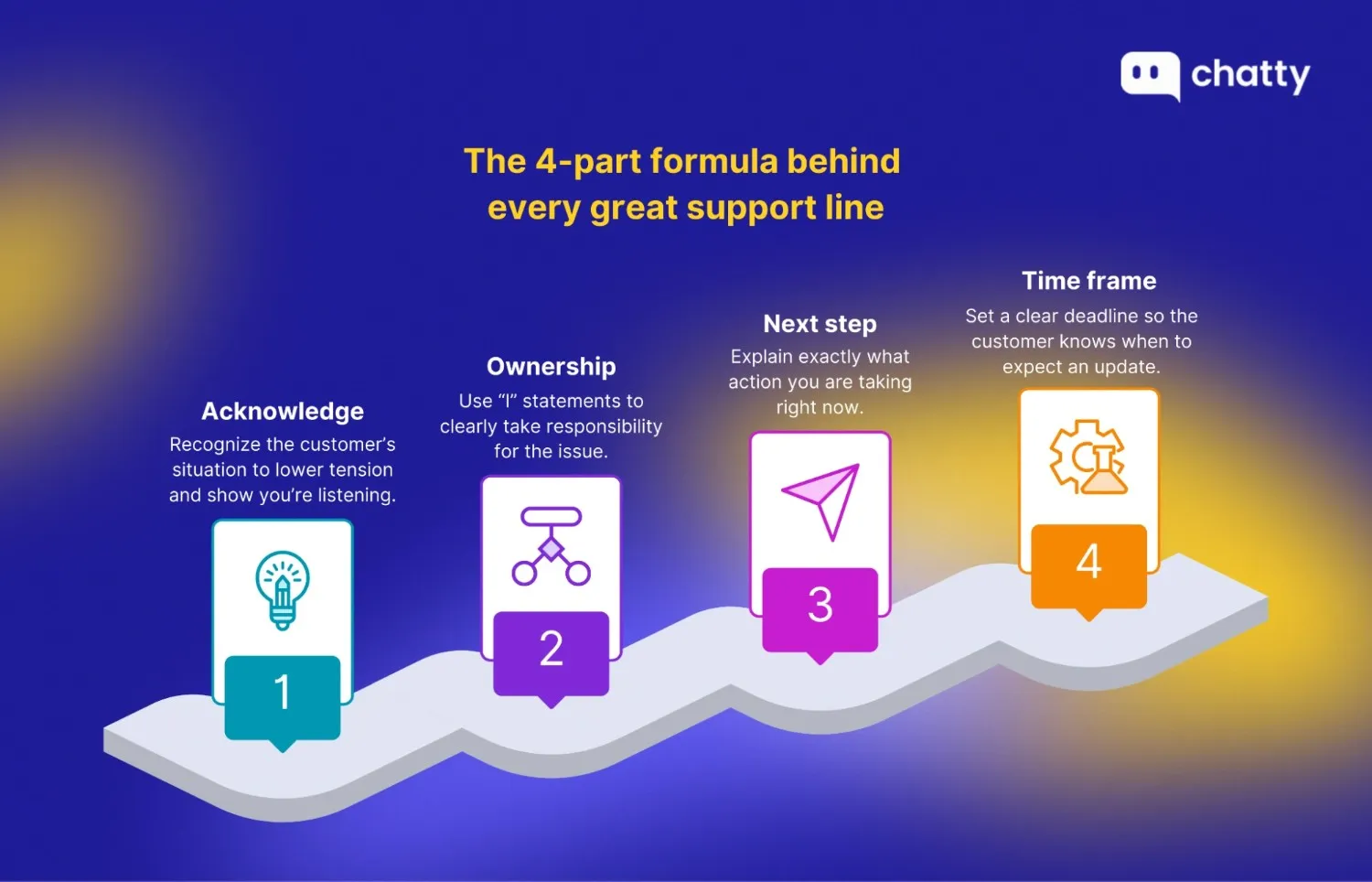
Every solid support interaction relies on a repeatable four-step structure: Acknowledge → Ownership → Next Step → Time Frame.
This formula works because it systematically addresses the customer's emotions first before solving the logical problem. You start by validating their reality to lower tension and immediately shift to personal responsibility using "I" statements. Then you explain the exact action you are taking and finish with a clear deadline so they are never left guessing.
You can see how this transforms a vague, robotic reply into a professional commitment in the following comparison.
- Before: "We received your request about the billing error. We will get back to you soon."
- After: "I completely understand why seeing this unexpected charge is worrying. I am digging into your transaction history right now to trace the source. I will have an answer for you and email you an update by 5 PM today."
The second version removes anxiety because it answers every question the customer hasn't even asked yet. You can ensure your team hits this standard by running their drafts through this simple audit checklist:
- Does the opening sentence name the specific pain point?
- Is there an "I" statement to prove personal ownership?
- Is the next physical action clearly defined?
- Is there a specific time or date for the next update?
- Did you remove any passive language that sounds like blaming?
Consistently hitting these points ensures you are managing the person, helping you sharpen essential customer service skills even when the actual solution takes time.
Channel playbook: how the same message changes in chat vs email vs phone
The meaning can stay the same, but the wording should change by channel. Customers expect different speeds and different details in chat, email, and phone. If you use the same line everywhere, it often feels slow in chat, incomplete in email, or careless on the phone.
Here are 3 practical rules to follow:
- Chat: Keep it short and confirm fast, since chat users often expect quick replies. If you need time, send a brief check-in message with the next update time.
- Email: Make a single complete reply and bundle the questions you need so you don't go back and forth. Explain why each detail is needed and how it helps the customer respond correctly.
- Phone: Following proper phone etiquette, always ask permission before placing someone on hold or transferring the call. End with a short recap of next steps and timing, so both sides leave aligned.
Example with the same intent: "asking for details."
| Chat | Phone | |
|---|---|---|
| "I can see the issue. Please send your order ID and a screenshot, and I'll be back with an update in 10 minutes." | "To resolve this in one go, please reply with your order ID, the account email, and a screenshot of the error message." | "I can help right away. Before I check, may I confirm your order ID and account email? At the end, I'll recap the plan and timeline." |
To keep the tone consistent without sounding fake, use these micro-guidelines as your default:
- Exclamation marks: In chat, one is usually enough. In email and phone notes, the fewer, the better.
- Emojis: Use them lightly in chat only when the customer is calm. In email and post-call follow-ups, it's usually safer to skip them for clarity and professionalism.
- Friendliness level: Start with a calm, respectful tone that matches the customer's mood. Once things cool down, you can sound warmer.
The phrasebook: 40+ scripts for every vibe
You can't script empathy, but relying on well-crafted canned responses ensures you always have the right structure ready. Here are 40+ battle-tested phrases organized by the specific moment in the conversation where they matter most, so you always have the right words ready.
The "warm welcome" (greetings & openers)
The first few seconds set the emotional tone for the entire interaction. Customers are often wondering, "Do they see me? Do they care? Are they going to make this hard?" A strong opener immediately signals that they have reached a human who is ready to take ownership.
Here are a few ways to start on the right foot:
- Standard (safe): "Hi [Name], thanks for reaching out. How can I help you today?"
- Returning customer: "Welcome back, [Name]. Good to see you again. Are we following up on your last ticket, or is this something new?"
- After a delay: "Thanks for waiting, [Name]. I appreciate your patience. I'm ready to help you now."
- Formal: "Good morning/afternoon, [Name]. You've reached [Company]. I'm [My Name], and I'm here to support you."
- Casual (chat): "Hey [Name]! Thanks for saying hi. What's going on today?"
For example, if a customer says, "My login is broken again," a weak reply would be "Login issues noted." A better version is: "Hi Sarah, thanks for flagging this. I see you had a similar issue last week. Let's see if this is related or a new glitch."
Pro tip: Match their tone. If a customer is furious, don't be overly cheery. Start with calm professionalism to de-escalate, then warm up only after you have signaled you are taking their problem seriously.
The "I hear you" (empathy & validation)
This is the most critical step when a customer is frustrated or disappointed. They aren't just looking for a fix. They are thinking, "Do you actually get why this is annoying, or are you just reading a script?" You must use emotional intelligence to validate their reality before you can move to a solution.
Try these phrases to show you truly understand:
- Frustration: "I can completely understand why that is frustrating. I would feel the same way if I were in your shoes."
- Disappointment: "I'm sorry to hear that [Product] didn't meet your expectations this time. That's not the experience we want you to have."
- Urgency: "I see how critical this is for your deadline today. Let's make this a priority."
- Confusion: "That definitely sounds confusing. Thank you for bringing this to my attention so we can clear it up."
- Serious issue: "I want you to know I'm taking this seriously. I'm going to personally oversee this until it's sorted."
Imagine a customer says, "I missed my presentation because your app crashed!" A standard apology feels hollow. Instead, try: "I am so sorry about that. I know how important that presentation was and how stressful a crash is in that moment. Let's figure out exactly what happened."
Pro tip: Be authentic. Don't use "copy-paste" apologies. Apologize for the specific impact on their life (e.g., "I'm sorry this made you late for your meeting"), which proves you actually read their message.
The "detective" (gathering information without annoying)
You often need more details to solve an issue, but customers can easily get annoyed, thinking, "Why are you asking me this? Just fix it." The trick is to frame your questions as the key to a faster solution, not just a bureaucratic hoop they have to jump through.
Use these lines to get what you need without friction:
- Clarification: "Just to be sure I'm looking at the right thing, could you confirm if this is happening on the mobile app or the desktop version?"
- Account details: "To help me find your account quickly, could you share the email address you used to sign up?"
- Screenshots: "Would you mind sending a quick screenshot of that error? That will help our engineers pinpoint the bug much faster."
- Timeline: "When did this first start happening? That helps me trace it back to any recent updates."
- Verification: "Before we make any changes to your plan, can I get you to verify the last 4 digits of your card for security?"
If a user just says, "It's not working," avoid a blunt "What's wrong?" Instead, ask: "I want to get this fixed for you asap. Could you tell me exactly which button isn't responding? That helps me test the right feature on my end."
Pro tip: Explain the 'Why'. Customers are happy to do "work" for you if they know why. Always link your question to the benefit: "This helps me find the glitch faster."
The "fixer" (solutions & action)
This is the moment the customer has been waiting for. They are thinking, "Finally. Is this going to work?" When you present a solution, be clear and direct. Use action verbs and tell them exactly what will happen next so they feel the momentum.
Here are powerful ways to present your fix:
- Direct fix: "I've updated your settings from my end. Please refresh your page, and it should work now."
- Workaround: "While our team works on a permanent patch, here is a quick workaround that will get you back online immediately."
- Instruction: "If you can go to [Settings] and click [Reset], that usually clears this error. I can walk you through it if you like."
- Escalation: "I'm going to pass this to our tech team for a deeper look. I've already briefed them on the details, so you won't have to repeat yourself."
- Options: "We can handle this two ways: I can process a refund now, or I can send a replacement unit overnight. Which do you prefer?"
When a customer demands, "I need this changed now," a weak reply is "Okay." A strong reply is: "Done. I have manually updated your profile. You should see the correct details the next time you log in."
Pro tip: Prioritize action over policy. Never start with what you can't do. Even if the answer is "no," start with the solution you can offer. "I can't refund that" becomes "I can offer you a credit for your next purchase."
The "pause button" (holds & delays)
Sometimes you need to step away to check information. This is a high-anxiety moment for customers who worry, "Are they still there? Did they forget me?" You need to ask for permission and set a clear expectation so they don't hang up.
Use these scripts to buy yourself time gracefully:
- Brief hold: "Do you mind if I put you on a brief hold? I need to check the transaction logs with our billing team."
- Checking information: "Give me just a minute to pull up your file so I have all the details in front of me."
- Longer wait: "This might take about 5 minutes to run. Are you okay to hold, or would you prefer I email you the result?"
- Checking in: "Thanks for holding. I'm still here and just finishing up that check. It should be another minute."
- Transferring: "I'm going to connect you with our specialist, Jane. I've already explained the situation to her so she can pick up right here."
If a situation is complicated, don't just go silent. Say: "I want to get the details right. Can I place you on a brief hold for 2 minutes while I double-check the policy?"
Pro tip: Follow the "check-in rule." If you go silent for more than 2 minutes, pop back in with a simple "I'm still here, just working on X" to keep the connection alive.
The "grand finale" (closing)
How you end the conversation determines the lasting impression. The customer is thinking, "Is it actually fixed? Can I leave now?" You want to confirm the solution, ensure they have no other issues, and close on a high note without rushing them.
End strong with these phrases:
- Confirmation: "I'm glad we could get that sorted out. Is there anything else I can help you with today?"
- Next steps: "You're all set! You'll receive a confirmation email with these details in about 5 minutes."
- Reassurance: "If anything else comes up, just reply to this thread, and I'll jump right back in."
- Appreciation: "Thanks for your patience while we fixed this. Have a great rest of your day!"
- Soft close: "I'll go ahead and close this ticket now, but feel free to reopen it if you need more help."
Instead of a generic "Bye," try: "Awesome! I'm happy we fixed it. I'll send a recap to your email just in case. Have a great week!"
Pro tip: Avoid the ticket closed feel. Don't make the customer feel like a number you are rushing to cross off to hit your KPI. Ensure they truly have no other questions before you say goodbye.
Top 10 customer service phrases to avoid
| Phrase to avoid | Why it's a problem | Better alternative |
|---|---|---|
| 1. "Calm down." | This invalidates their emotions and often makes them angrier. It sounds dismissive and can escalate the situation. | "I understand this is frustrating. Let me see what I can do to help right away." |
| 2. "That's not our policy." | Starting with what you can't do puts you in an adversarial position. It sounds like you're hiding behind rules. | "Here's what I can do for you: I can offer [solution] or [alternative]." |
| 3. "You're wrong." | Telling a customer they are incorrect, even if they are, damages the relationship and makes them defensive. | "I can see why you'd think that. Let me clarify what actually happened here." |
| 4. "There's nothing I can do." | This phrase signals you've given up. Customers hear "I don't care enough to try." | "This is tricky, but let me check with my team to see what options we have." |
| 5. "You should have…" | Blaming the customer for not reading instructions or following steps creates resentment. | "No problem. Let me walk you through the right steps now so this doesn't happen again." |
| 6. "I'm just following the rules." | This makes you sound like a robot with no authority or empathy. | "I want to help. Let me see if there's any flexibility here or find another solution." |
| 7. "That's impossible." | Absolute language shuts down the conversation and makes you seem inflexible. | "That's not something we typically do, but let me explore what we can arrange." |
| 8. "To be honest with you…" | This unintentionally implies you weren't being honest before. It can erode trust. | Just skip this phrase and say what you need to say directly. |
| 9. "As I said before…" | This sounds condescending, as if the customer wasn't listening. It creates friction. | "Let me clarify that point again to make sure we're on the same page." |
| 10. "You'll need to contact another department." | Passing the buck without helping signals "not my problem." Customers feel abandoned. | "I'm going to connect you with [Department] and brief them on your issue so you don't have to repeat yourself." |
How to measure if your phrases are working
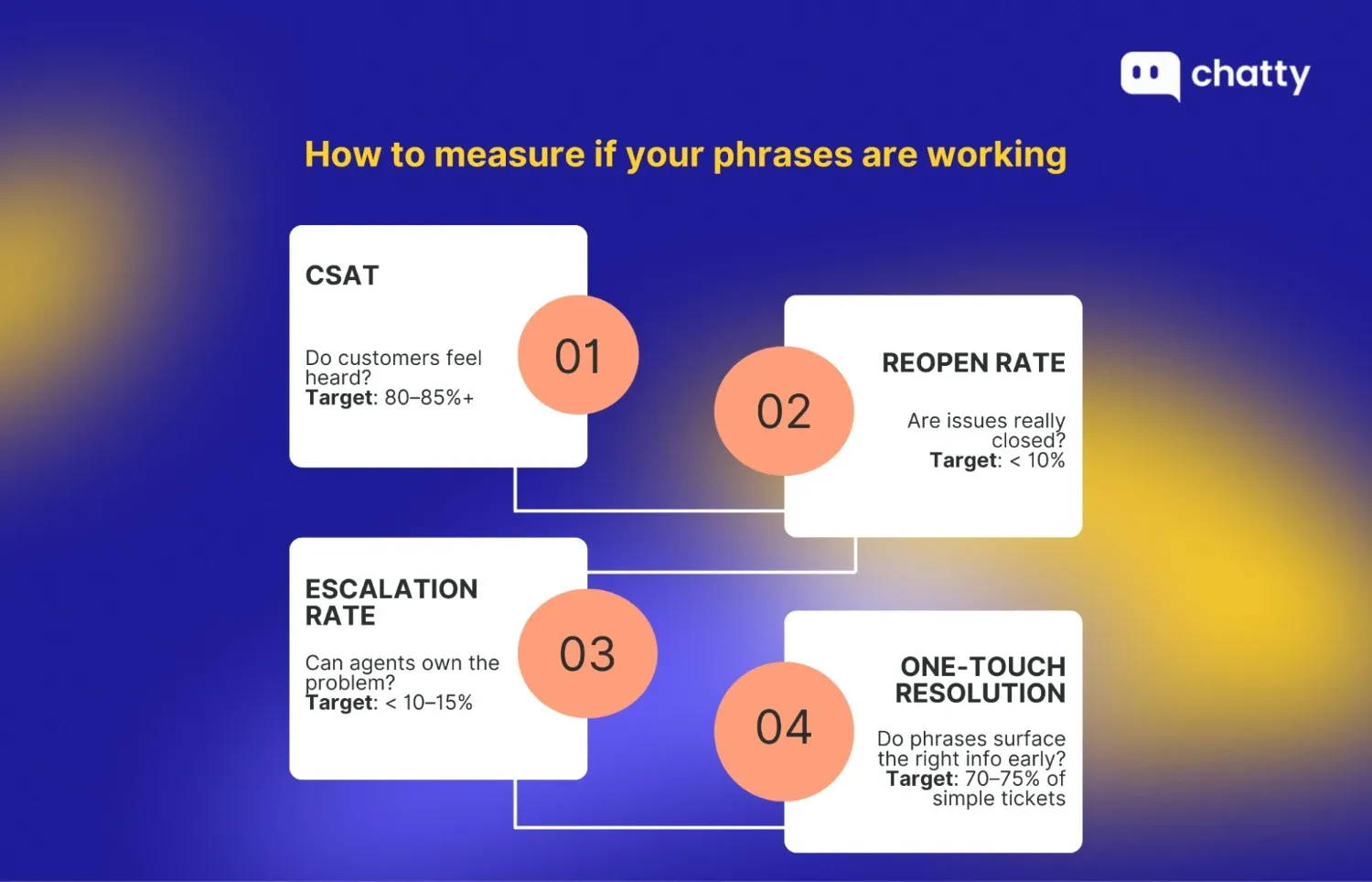
Here are the simple metrics everyone can track, along with realistic benchmarks to aim for:
- CSAT (customer satisfaction score): This is your direct feedback loop. A healthy support team typically aims for a score above 80-85%. If your empathy phrases are genuine, this number should climb because customers feel heard.
- Reopen rate: This measures how often a "solved" ticket gets a new reply. A good benchmark is under 10%. If yours is higher, your closing phrases might leave loose ends or fail to confirm the solution.
- Escalation rate: This tracks how many tickets get passed to a manager. Ideally, you want this below 10-15%. Stronger ownership phrases help agents resolve more issues on the front line without needing backup.
- One-touch resolution: Good "detective" phrases help you get all the info upfront. Top-performing teams often resolve 70-75% of simple tickets in a single interaction.
You can easily validate if your new playbook is driving these numbers without any special software. Simply run an A/B test by assigning half your team to use a new "opener" or "expectation-setting" line for two weeks while the other half sticks to the old version. At the end of the sprint, compare the CSAT and Reopen Rates between the two groups. If the new phrases are effective, you will see a clear dip in reopens and a measurable bump in happiness scores.
Warning signs your phrases are failing:
- Increased reopens: Customers keep replying with "But what about…?" because your explanation wasn't clear.
- "Are you there?" messages: If this question appears frequently, your "pause button" phrases aren't setting clear time expectations.
- Spikes in escalations: If customers constantly demand a manager, your "ownership" phrases might sound too robotic or powerless.
The Bottom Line
To wrap things up, we know that mastering these customer service phrases takes a bit of practice, so don't feel like you need to memorize them all today. Start by picking just one new script for your next tricky ticket and see how much faster the tension drops. Once you find the words that fit your style, you'll naturally sound more like a helpful partner and less like a support bot.