




 Blog
 Free tools
 Help center





To increase Shopify sales, work on the four parts revenue is made of: traffic, conversion rate, average order value and repeat orders. For most stores, the fastest gains sit in the middle two.
You can fix both without a new app. Make each product page answer the buying question, reply to shopper questions before they leave, and price your offers around what shoppers already spend.
Most stores try to increase online sales the other way round. They add budget to ads and install another app, while the orders they already paid for slip away on the product page. This guide starts where those orders are lost.
- Fix the product page first, because every later step depends on it.
Put fit, compatibility, total cost, delivery time and returns next to Add to cart, using metafields and the theme editor.
- Shorten checkout with the settings Shopify already has.
Turn on Shop Pay and dynamic checkout buttons, keep guest checkout on, cut fields you do not need and check mobile speed.
- Write answers to repeat questions into your store before adding any tool.
Add an AI sales agent only when shoppers ask more about their own case than your team can answer in time.
- Raise order value with pricing rather than site-wide codes.
Set free shipping just above your average order value and use Shopify's automatic Buy X get Y discounts.
- Bring first-time buyers back with what Shopify already sends.
Use the abandoned checkout email, the thank-you page, a review request after delivery and a timed reorder reminder.
Where Shopify sales are actually lost
Shopify sales are lost between the click and the cart, and that is where more traffic helps least. Every Shopify store's revenue comes from the same four numbers multiplied together, so it helps to see them side by side:
- Traffic: how many people reach your store.
- Conversion rate: the share of those visits that end in an order.
- Average order value: how much each order is worth.
- Repeat orders: how often a buyer comes back.
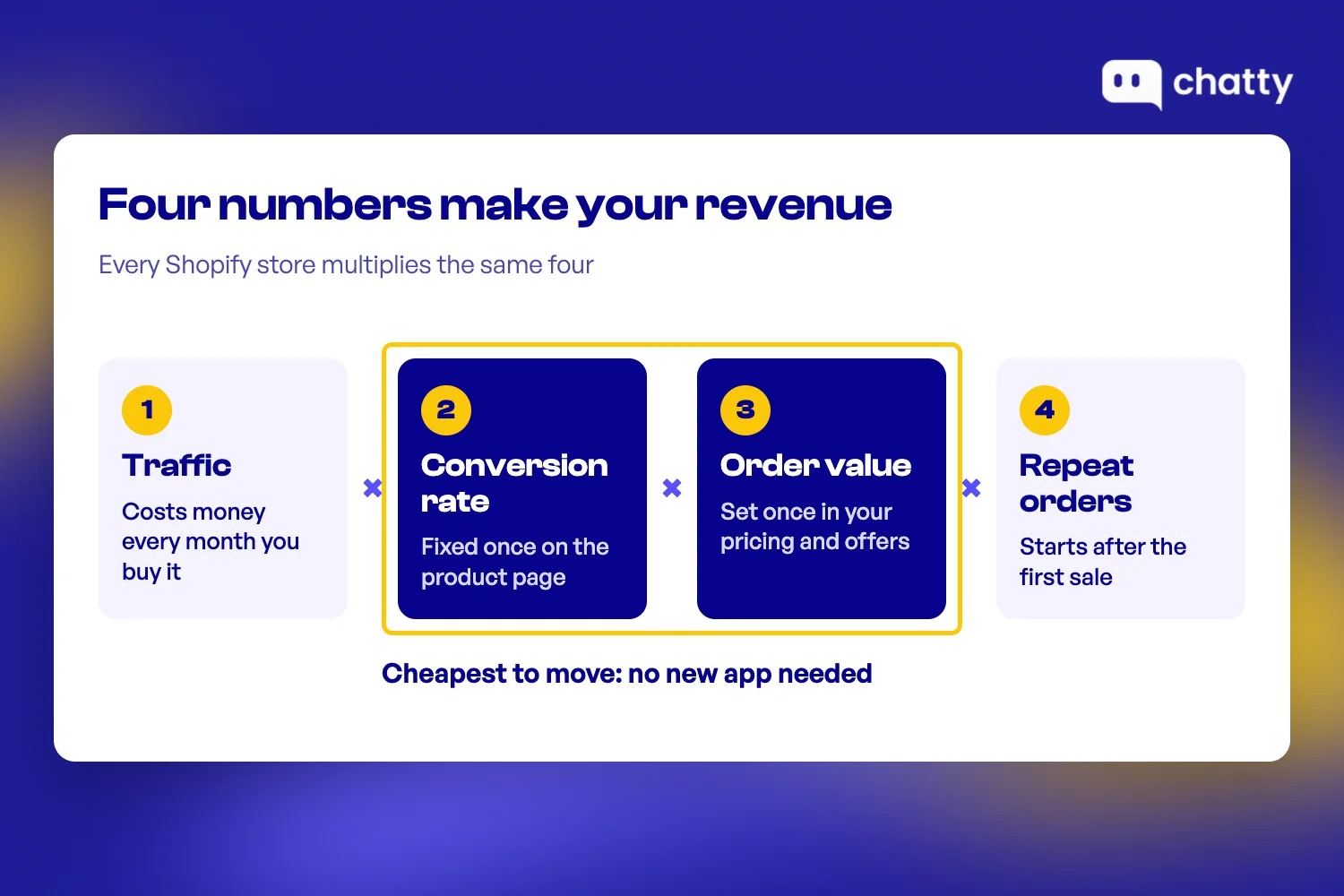
Because the four numbers multiply, a gain in any one of them lifts revenue by the same share. A conversion rate that rises by a tenth has the same effect on sales as a tenth more visitors.
The difference is what each gain costs. More visitors cost money every month, through ads, influencers or discounts that pull people in. A better product page costs a few hours once, and it keeps working for every visitor after that.
More traffic can even make the problem look worse. New visitors from ads land on the same product pages, hit the same unanswered questions and leave at the same point. Your cost per order rises while the page stays unchanged.
Order value works the same way. When a shopper who planned to buy one item adds a second, you earn more from a visit you have already paid for.
So the work starts with the visitors you already have. The five ways below follow a shopper from the product page to a second order.
5 ways to increase Shopify sales without installing more apps
Each way below uses settings and pages Shopify already gives you, and each one makes the next one work better. Start with the product page, because every later step depends on it:
1. Fix the product page so it answers the buying question
A product page converts when it answers the one question a shopper needs settled before buying. Clothing shoppers ask whether it will fit, and parts shoppers ask whether it works with what they own. Almost everyone also asks what it costs and when it arrives.
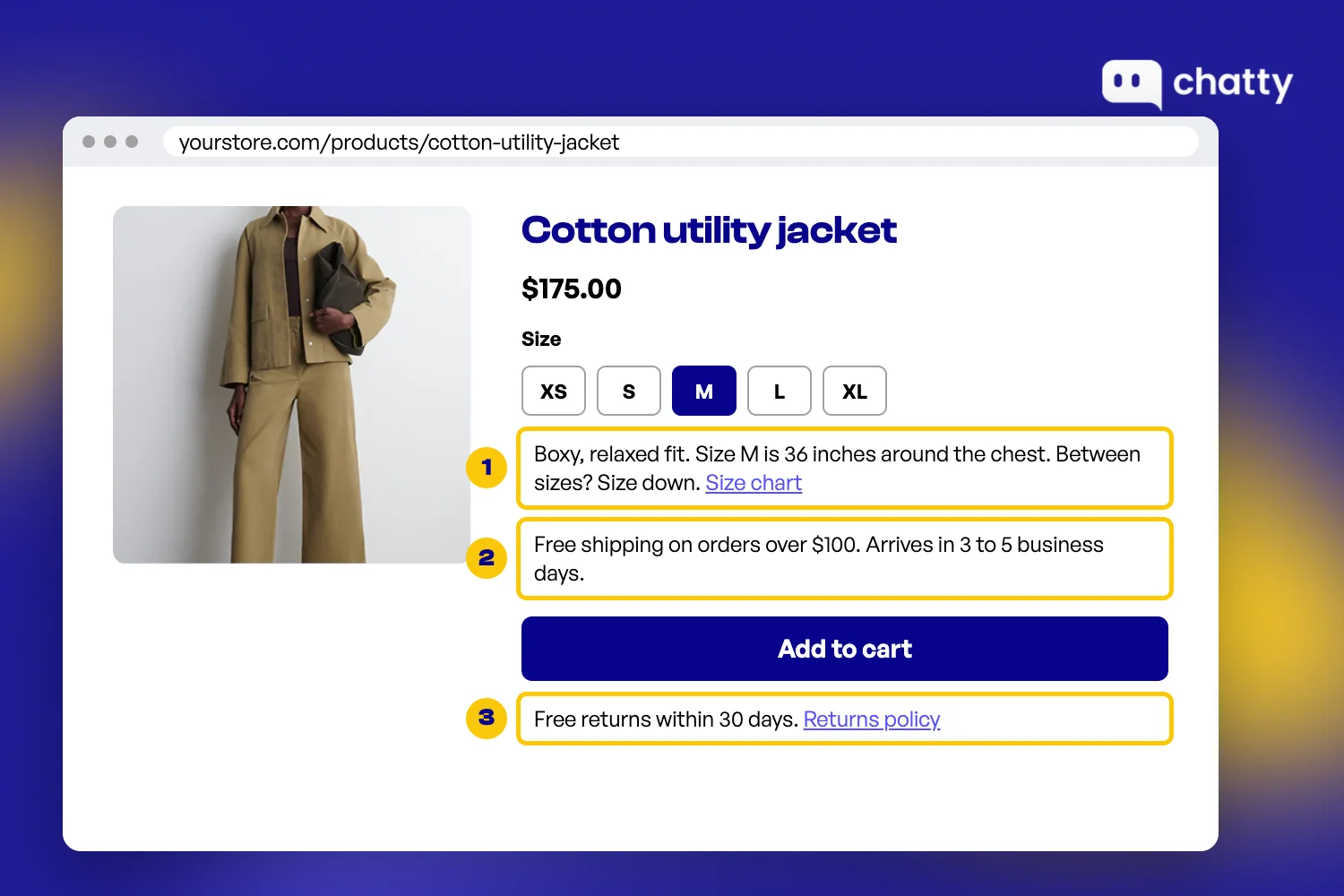
Shoppers who cannot find that answer rarely ask. Instead, they open another tab and buy from a store whose page made the decision easier. Six fixes cover most of the gap, in the order shoppers look for them:
Put size and fit next to the variant picker
A size chart in the footer helps nobody at the moment of choosing. Place a short fit note right under the size buttons, then link the full chart from that note. A line such as "Runs large, size down if you are between sizes" is enough.
Shopify lets you store this per product with product metafields. Most current themes can show a metafield in the theme editor, so each product gets its own fit note without editing code.
List what the product works with
For parts, accessories and electronics, the buying question is compatibility. A plain list such as "Fits iPhone 14, 15 and 16" or "Works with 1-inch ball mounts" answers it faster than any paragraph of description.
Keep the list in a metafield as well, so it stays accurate when you add new models. If shoppers keep asking about a model that is missing, add it to the list or say clearly that it does not fit.
Show the total cost and delivery date before the cart
Surprise costs are the biggest reason shoppers walk away. In Baymard's survey of US shoppers who abandoned a checkout, 40% left because extra costs such as shipping, tax and fees were too high. Another 20% left because delivery was too slow.
Both answers belong on the product page, not at the last checkout step. Add a line under the price with your shipping cost or free shipping minimum, plus an estimated delivery window for your main market.
Add one line on returns next to Add to cart
Returns are the third question, especially for first-time buyers. The same Baymard list shows 13% of those shoppers left because the returns policy did not satisfy them.
You do not need to paste the full policy. A single line such as "Free returns within 30 days" next to the button settles the doubt at the moment it appears. Link that line to the full policy.
Use photos that show scale and detail
Many questions are really photo problems. Questions about size and hidden details disappear when one photo shows the product in a hand or next to a familiar object.
Add one scale photo and one close-up of the detail shoppers ask about most, such as a zip, a port or a fabric. Then write a short alt text for each, so the answer also reaches shoppers using screen readers.
Check every answer on a phone
On a phone, a long description pushes the answers below the fold. Open each of your top product pages on your own phone and scroll as a shopper would.
If the fit note, delivery line or returns line sits below the reviews, move it up. Collapsible rows in most themes keep the page short while the answers stay one tap away.
Once the page answers the question, the next leak is the path from Add to cart to a paid order.
2. Remove friction from checkout and mobile
Checkout and mobile are where a shopper who already decided can still slip away. In Littledata's 2026 benchmark of 433 Shopify stores, the median store got 67% of its traffic from mobile. Only 51% of the checkouts started at the median store were completed.
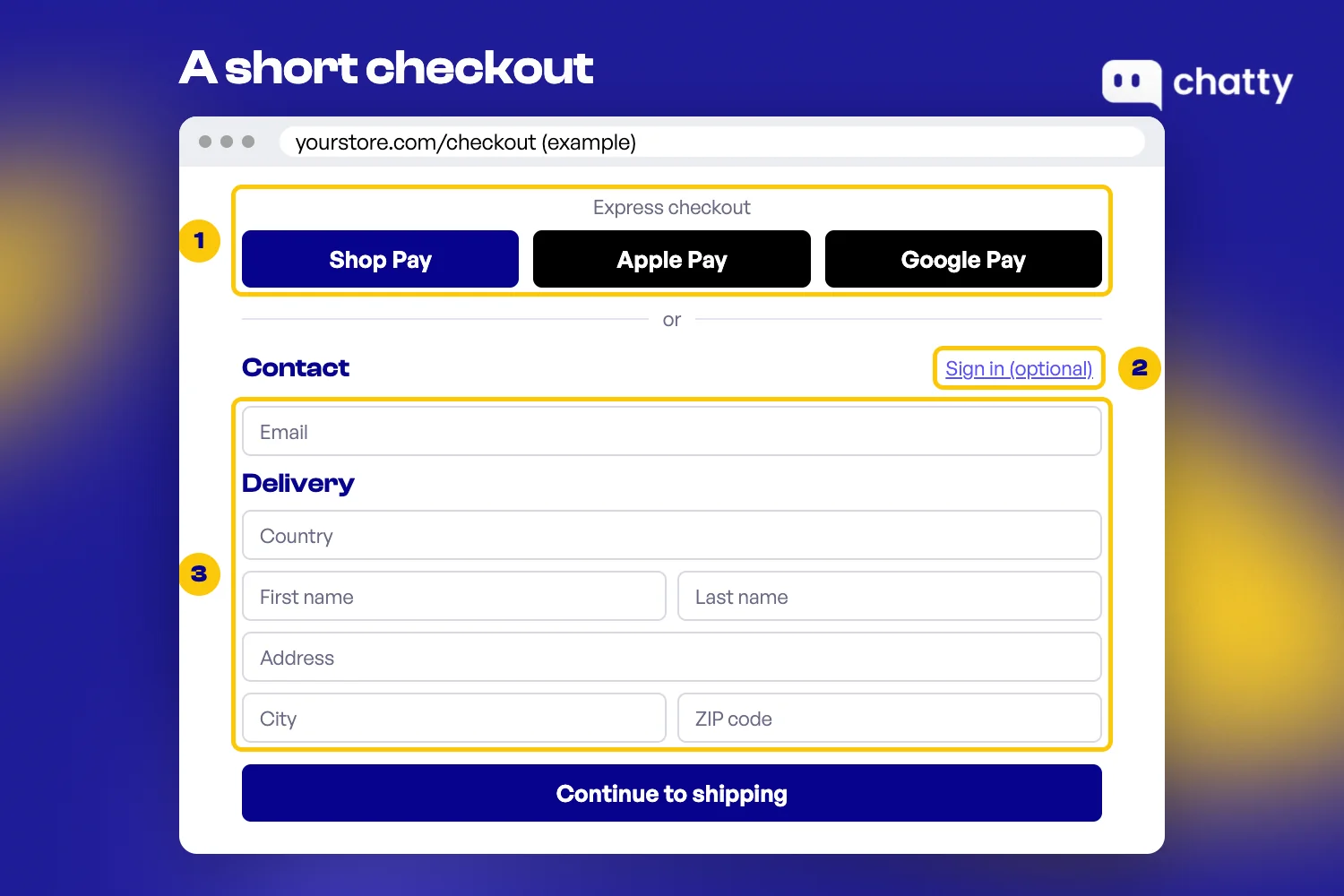
Four native settings close most of that gap. Here is where to find each one in Shopify admin:
Turn on Shop Pay and accelerated checkout buttons
Shop Pay fills in the address and card for shoppers who already use it. Shopify says it converts up to 50% better than guest checkout, citing an April 2023 study. Treat that as Shopify's own figure and measure your own store.
To turn it on, go to Settings, then Payments, click Manage in the Shopify Payments section and check Shop Pay. Then open Online Store, Themes, Customize, choose Product pages and check Show dynamic checkout button.
Payment choice matters beyond Shop Pay. The same Baymard survey found 9% of shoppers left because the store had too few payment methods.
Keep guest checkout on
Forced sign-up is a quiet sale killer. In Baymard's survey, 18% of shoppers abandoned because the site wanted them to create an account.
Go to Settings, then Checkout, and under Customer contact method leave Require customers to sign in to their account before checkout turned off. Shopify also hides accelerated buttons such as Apple Pay in the cart while that setting is on.
Cut the checkout fields you do not need
Every extra field is one more reason to stop. Baymard's checkout research found the average checkout in 2024 had 11.3 form fields, while most sites need only 8.
The cost shows up in abandonment too, since 17% of shoppers in Baymard's survey left because checkout was too long or complicated. In Settings, then Checkout, open Customer information and set Company name to Don't include if you do not sell to businesses.
Keep the shipping address phone number optional unless your carrier needs it. Leave Address line 2 optional as well, because Shopify warns that some shoppers cannot finish if it is required or removed.
Check mobile speed in Shopify's own report
Speed matters most on a phone. A 2020 study by Deloitte and 55 for Google found that when mobile sites loaded 0.1 seconds faster, retail shoppers spent 9.2% more.
Go to Analytics, then Reports, and open the web performance reports to see your store's loading and layout scores. If they are poor, Shopify's speed guide suggests removing apps that do not earn their keep, resizing images and cutting sections from heavy templates.
For testing ideas on top of these settings, our conversion rate guide goes further. A fast, short checkout still loses the shopper whose question no page answered, though.
3. Answer the question that stops the sale
The sale usually stops on a question the page did not answer, and it is often about the shopper's own case. Will it fit my frame, does it work with my model, can it arrive by Friday?
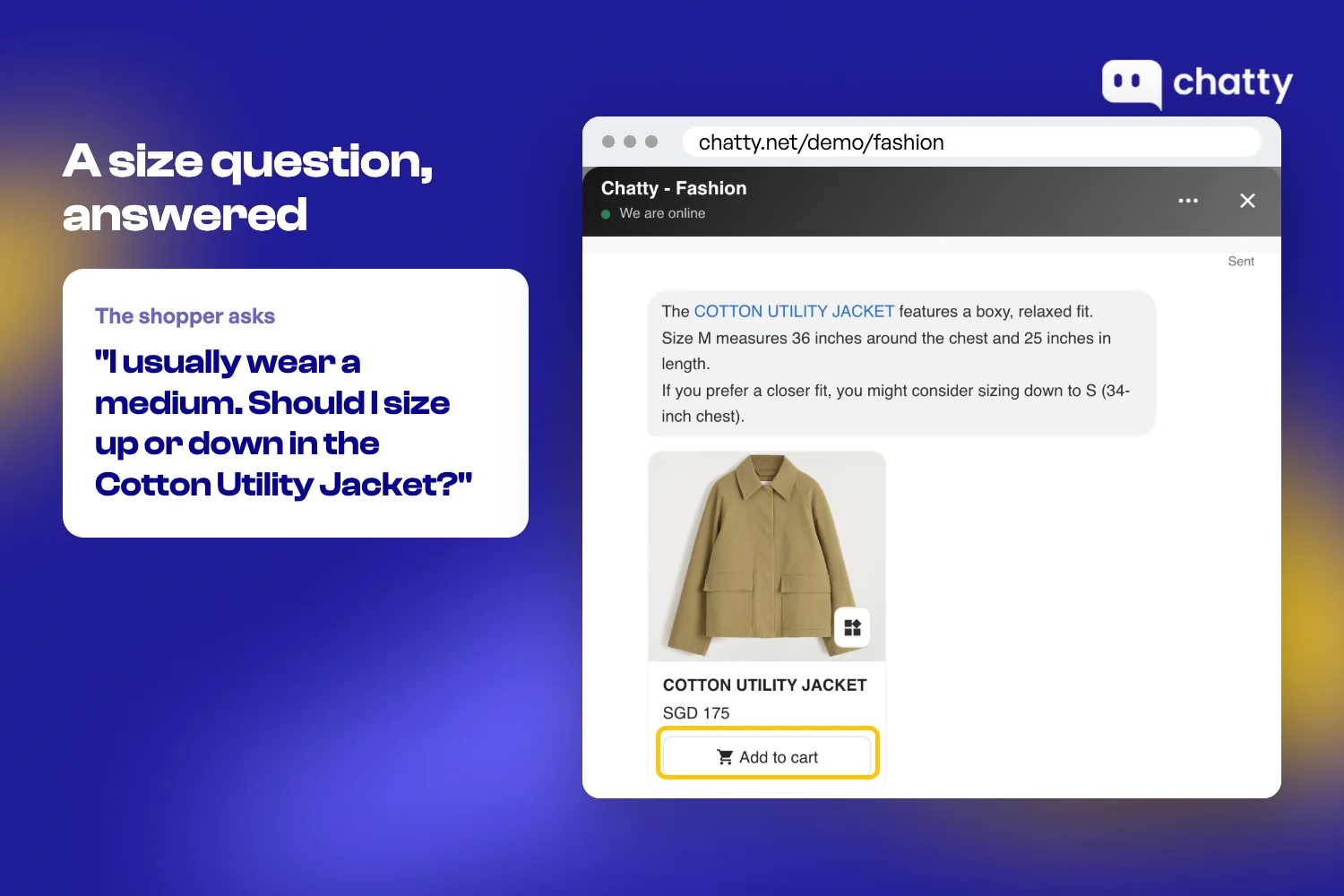
Two steps handle these questions, starting with the one that costs nothing:
Write the missing answers into your store first
Many of these questions repeat from shopper to shopper. The cheapest fix is to collect the questions you already receive and publish the answers. Go through a month of emails, chat messages and social comments, then write down every question that came up more than twice.
Group the answers by where the shopper was when they asked:
- Product questions go on the product page, near the variant picker or the price.
- Policy questions about returns, delivery and discounts go in a store FAQ linked from every product page.
- Promotion rules, such as whether codes stack or when a sale ends, go on the promotion banner itself.
Be honest when the answer is no. A line such as "This mount does not fit 2-inch bars" loses one sale. It also saves you a return and keeps shoppers trusting the rest of the page.
Our FAQ templates give you a starting structure for the policy page. Update it every time a new question shows up twice.
Answer live when the questions outgrow your team
Written answers stop working once shoppers ask about their own case in detail. A question like "Will this fit my frame?" needs a reply in the moment. A small team cannot answer every one before the shopper leaves.
When nobody answers, the visit you paid for ends without an order. Closing that gap is the job of an AI sales agent, the one place in this guide where a new tool earns its spot. Our guide to the best Shopify apps to increase sales compares the options.
Chatty is the AI sales agent for Shopify stores. AI chatbot and live chat are two standout features of Chatty. The AI chatbot answers from your own Shopify data, and with live chat your team takes over from the AI and closes the sale.
On your store, here is what that looks like for a shopper with a question:
- Answers from your store's data: products, prices, stock, discounts and shipping, so the reply matches the page.
- Recommends the right product: it asks what the shopper needs and suggests the variant that fits.
- Adds to cart: the item goes into the shopper's real Shopify cart, and Chatty sends the checkout link in the conversation.
- Hands over to your team: when the AI is not sure, the chat moves to a person with the history attached.
Proactive messages run on every plan. The cart booster and abandoned cart reminder templates need Pro or above, so check the plans before you count on them.
Accuracy matters when an AI quotes prices and stock to your shoppers. 92% of product answers were right on price, stock and details when we compared 300 real Chatty answers with each store's website in October 2026.
6,200+ stores have made sales with Chatty, and it holds a 4.9 rating from 1,890 reviews on the Shopify App Store. Chatty marks every order it assisted in Shopify, so you can check the return yourself, as our guide to orders that came from chat explains.
Two stores show what this looks like when the buying question is hard. These are single-store results, not averages:
- Yoeleo Bike: shoppers asked whether a $999 wheelset fit their frame, and orders assisted by Chatty reached $29,586 in 30 days.
- High Tech Pet: 16.6% of buying conversations became orders, with 109 orders closed by the AI in its first 10 weeks.
Once shoppers get their answers, the next question is how much each order is worth.
4. Raise average order value with pricing, not pop-ups
The quickest way to raise average order value is to price your offers around what shoppers already spend. Shopify includes the tools for this in the admin, so the work is choosing the right numbers rather than adding software.
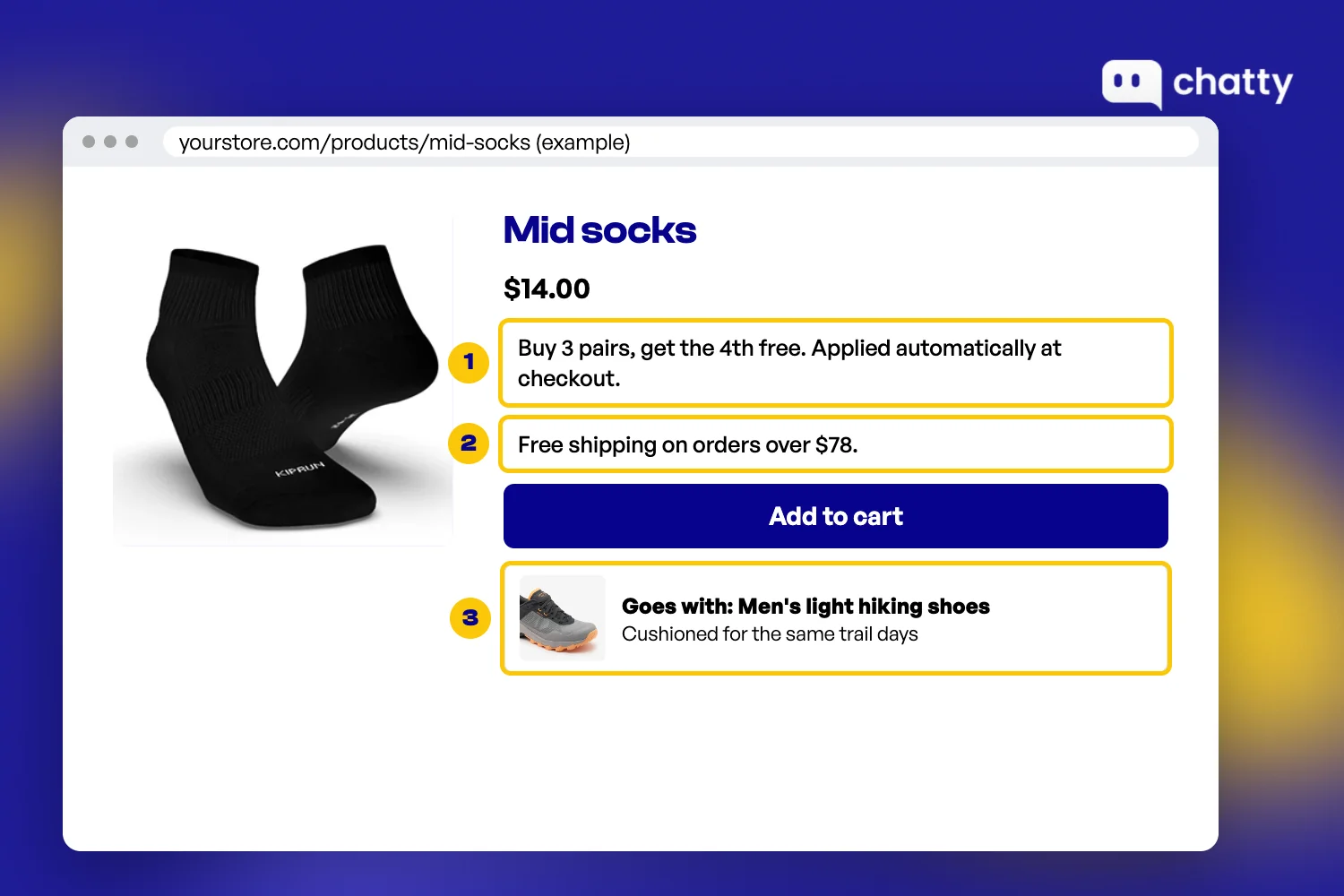
Three pricing moves do most of the work, plus one common move to hold off on. Here is how to handle each:
Set the free shipping minimum just above your order value
A free shipping minimum gives shoppers a reason to add one more item. It only works when the gap feels small, so the minimum should sit a little above your current average order value.
Shopify's own guide to average order value suggests setting the threshold 30% higher than your AOV. If your average order is $60, that puts the minimum near $78, close enough that one accessory gets the shopper there.
You set it in Settings, then Shipping and delivery, by editing a shipping option and choosing Offer free shipping with a minimum amount. Then show the minimum on the product page, so shoppers see it before the cart.
Use quantity offers instead of site-wide codes
A site-wide discount code cuts your margin on orders that would have closed anyway. It also teaches shoppers to wait for the next code before they buy.
A quantity offer works differently, because the discount only applies when the order grows. Shopify's Buy X get Y discount can run automatically on a minimum quantity or a minimum spend, with no code to type.
A simple version is "Buy 3, get 1 free" on a best-seller, or 10% off once the cart passes a set amount. Both reward a bigger basket without lowering the price of a single item.
It suits products people buy in multiples, such as socks, supplements or refills. Keep one offer live at a time, so you can see what it changed.
Show what goes with the product on the page
A shopper who buys a camera mount often needs the adapter too. A shopper who buys a dress may want the belt shown in the photo. Name those items in the product description and link them, so the second item is one click away.
Keep the pairing honest and specific. One item that completes the purchase sells better than a row of six loosely related products. Our product recommendation examples show what good pairings look like.
Leave the discount pop-up for later
A discount pop-up is the usual first move, and it works against the fixes above. It covers the product page at the moment the shopper is reading the answer you just wrote.
It also hands a code to people who were ready to pay full price. Add one later if you need email sign-ups, and measure it against the margin it gives away.
These moves raise the first order. The last way is getting a second one.
5. Bring first-time buyers back for a second order
Repeat orders are the lever most stores neglect, because the work starts after the sale. Yet a buyer who already trusts your store needs far less convincing than a new visitor.
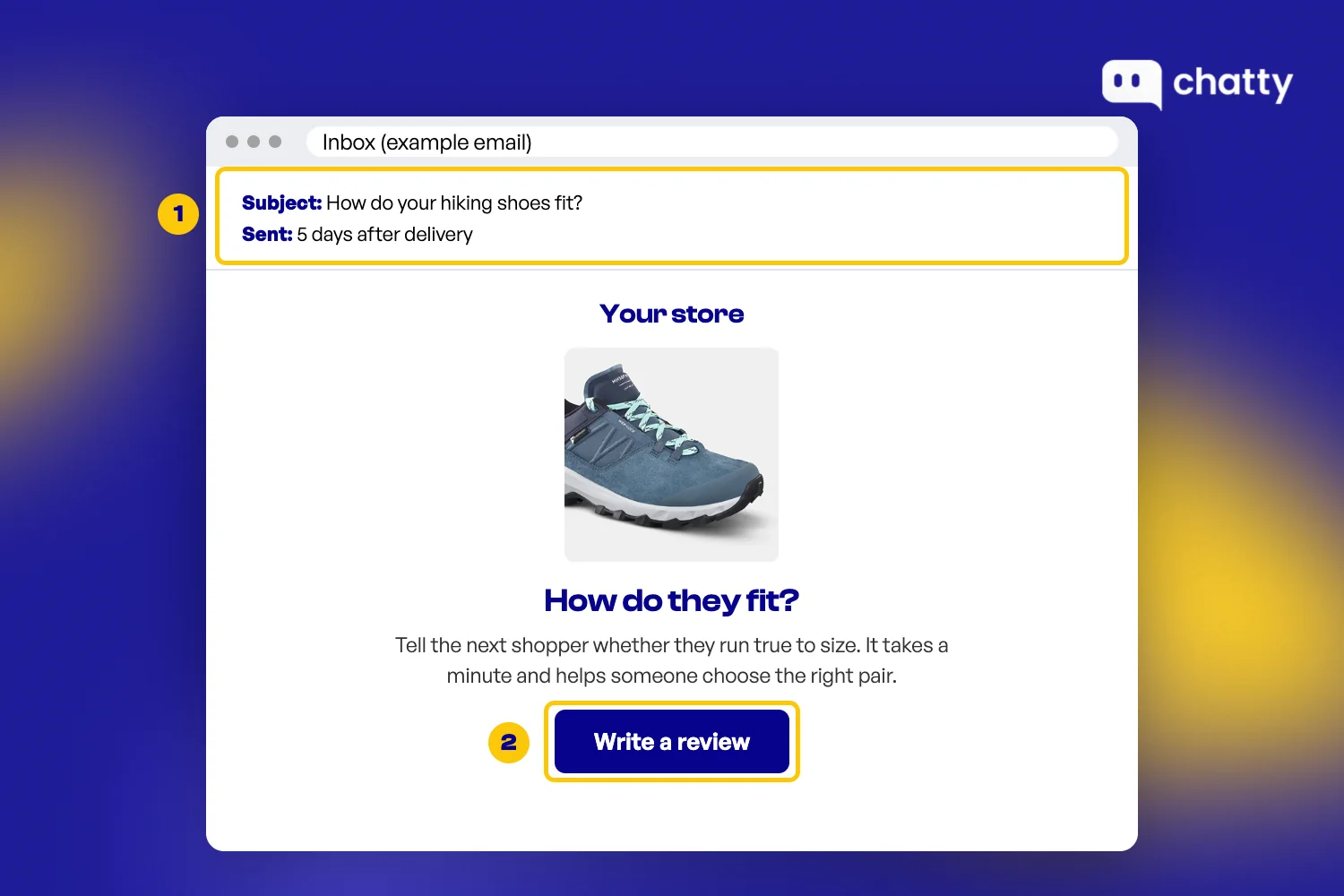
Shopify covers the basics without extra apps. Here are four places to start:
- Recover abandoned checkouts: Shopify's own Messaging tool includes a recover abandoned checkout automation. Turn it on and judge it by recovered orders, not open rate.
- Use the thank-you page: add a short note on how to use the product, plus a link to the item most buyers order next.
- Ask for a review after delivery: send a short email once the order has had time to arrive. A review that mentions fit or compatibility answers the next shopper's question on the product page for you.
- Time the reorder reminder: for products that run out, send one email shortly before a typical buyer would need more.
To know whether any of this works, track the share of buyers who order again. Our guide on how to calculate customer retention rate shows the formula and where to find the numbers.
A 30-day plan to increase Shopify sales
Five ways is a lot to start at once. The plan below spreads them over a month for a store owner with a few hours a week. It moves from the cheapest fix to the one that needs the most judgment:
| Week | What to do | Where in Shopify |
|---|---|---|
| Week 1 | Add fit notes, compatibility lists, delivery dates and a returns line to your ten busiest product pages, then turn on Shop Pay and trim checkout fields | Products, metafields and the theme editor; Settings, Payments and Checkout |
| Week 2 | Collect a month of shopper questions and publish the answers on product pages and your FAQ | Online Store, Pages |
| Week 3 | Set a free shipping minimum and one quantity offer | Settings, Shipping and delivery; Discounts |
| Week 4 | Turn on the abandoned checkout email and compare conversion rate and order value with the 30 days before | Marketing; Analytics |
Change one thing at a time where you can. In week three, start the free shipping minimum first and add the quantity offer a few days later. That way you can tell which one moved the numbers.
Read the results with some care. Compare the same days of the week, and leave out any week with a sale or a big ad push. Look at conversion rate and order value side by side, since a cheaper offer can lift one while it lowers the other.
If you only have time for one change, make it the product page. It costs nothing but a few hours, and every later step in this guide sells more once the page answers the buying question.
FAQs
Work on the four parts of revenue: traffic, conversion rate, average order value and repeat orders. Start with conversion and order value, because they raise what every visitor you already have is worth. Fix the product page, answer shopper questions quickly and set offers around your real order value.
The most effective ways use what Shopify already includes. Put fit, total cost and returns next to Add to cart, then turn on Shop Pay and keep guest checkout. Set a free shipping minimum and one quantity offer, and bring buyers back with the abandoned checkout email.
Traffic without orders usually means shoppers leave with a question nobody answered. Open your ten busiest product pages and check whether each one shows size or compatibility, total cost, delivery time and returns. Add whatever is missing before you spend more on ads.
It raises order value when the minimum sits a little above what shoppers already spend, so one more item gets them there. Set it in Settings, then Shipping and delivery, with the Offer free shipping option. Track average order value and conversion rate together for 30 days.
Not at first, because written answers on your product pages come first. Once questions outgrow your team, an AI sales agent such as Chatty can answer from your Shopify data and add the item to the cart. Our guide on whether chatbots increase sales covers the trade-offs.