





 Blog
Blog Free tools
 Help center



Shopify Analytics and Google Analytics 4 measure where shoppers drop. Microsoft Clarity shows why they leave.
One tool per step then fixes the leak, such as Judge.me or Chatty on the product page. Shopify Rollouts tests the fix, and the table below lists every tool by job.
With Shopify conversion rate optimization tools, the order matters more than the brand names. A new app does nothing on a step where shoppers weren't leaving. Install tools in the order of the work: measure, watch, fix, then test.
Every price and rating below was read on the vendor's pricing page or Shopify App Store listing on 28 October 2026.
- Measure
Shopify Analytics and GA4, both free, find the step where shoppers drop.
- Watch
Microsoft Clarity is free; Hotjar adds on-site surveys; Lucky Orange tracks cart and checkout drop-off inside a Shopify app.
- Fix
PageFly or Search & Discovery fix landing and collection pages, and Judge.me or Chatty fix the product page. Your theme's cart drawer fixes the cart, and Checkout Blocks fixes checkout.
- Test
Shopify Rollouts on the Grow plan or higher comes before Shoplift or Intelligems.
What are the best Shopify conversion rate optimization tools?
Shopify Analytics and GA4 are the best place to start, because they're free and tell you which step leaks. "Best" here means the right tool for the job you're on, rather than a ranking. Measure with those two, watch that step with one recording tool, fix it with one app, then test with Shopify Rollouts.
The table sorts the best Shopify conversion rate apps and free tools by job, in the order you'll need them.
| Job | Tool | Starting price (checked 28 Oct 2026) | Pick it when |
|---|---|---|---|
| Measure | Shopify Analytics | Included in every Shopify plan | You need the step-by-step funnel for your own store |
| Measure | Google Analytics 4 | Free | You need the drop split by traffic source and landing page |
| Watch | Microsoft Clarity | Free | You want recordings and heatmaps at no cost |
| Watch | Hotjar | Free plan; Growth $49/month ($39/month billed yearly) | You also want to ask shoppers why with on-site surveys |
| Watch | Lucky Orange | Free (100 sessions/month); Launch $19/month | You want cart and checkout drop-off tracked inside a Shopify app |
| Fix: landing page | PageFly | Free (1 published page); Builder $24/month | Your ads need a landing page your theme can't build |
| Fix: collection and search | Shopify Search & Discovery | Free | Shoppers search and filter before they choose |
| Fix: product page | Judge.me | Free plan; Awesome $15/month | Product pages have few or no reviews |
| Fix: product page | Chatty AI Sales Agent | Free plan; Basic $19.99/month | Shoppers ask a question before they buy |
| Fix: cart | Your theme's cart drawer | Included in the theme | Shoppers get pushed to a separate cart page |
| Fix: checkout | Shopify Checkout Blocks | Free (full checkout editing on Shopify Plus) | You need a message or rule on the thank-you or order status page |
| Test | Shopify Rollouts | Included; experiments need Grow or higher | You want to A/B test a theme or checkout change inside admin |
| Test | Shoplift | Core $99/month | You test templates and pages most weeks |
| Test | Intelligems | Smart Content $69/month | You want to test prices, shipping thresholds or offers |
The table can't tell you which row you need today, but the funnel in your admin can.
Which Shopify conversion rate optimization tools help find drop-offs?
Shopify Analytics and Google Analytics 4 find drop-offs, and both are free. A drop-off is the funnel step that loses the most shoppers, between all sessions, cart additions, reached checkout and completed checkout. Shopify Analytics shows which step leaks, GA4 shows which traffic leaks there, and that answer decides the tool you buy next.
Two free tools cover this job, and each one answers a different question.
Shopify Analytics: the funnel you already have
Shopify Analytics is best for every store, because the funnel report already sits in your admin. The report is called Conversion rate breakdown. It lists four steps: all sessions, sessions with cart additions, sessions that reached checkout and sessions that completed checkout.
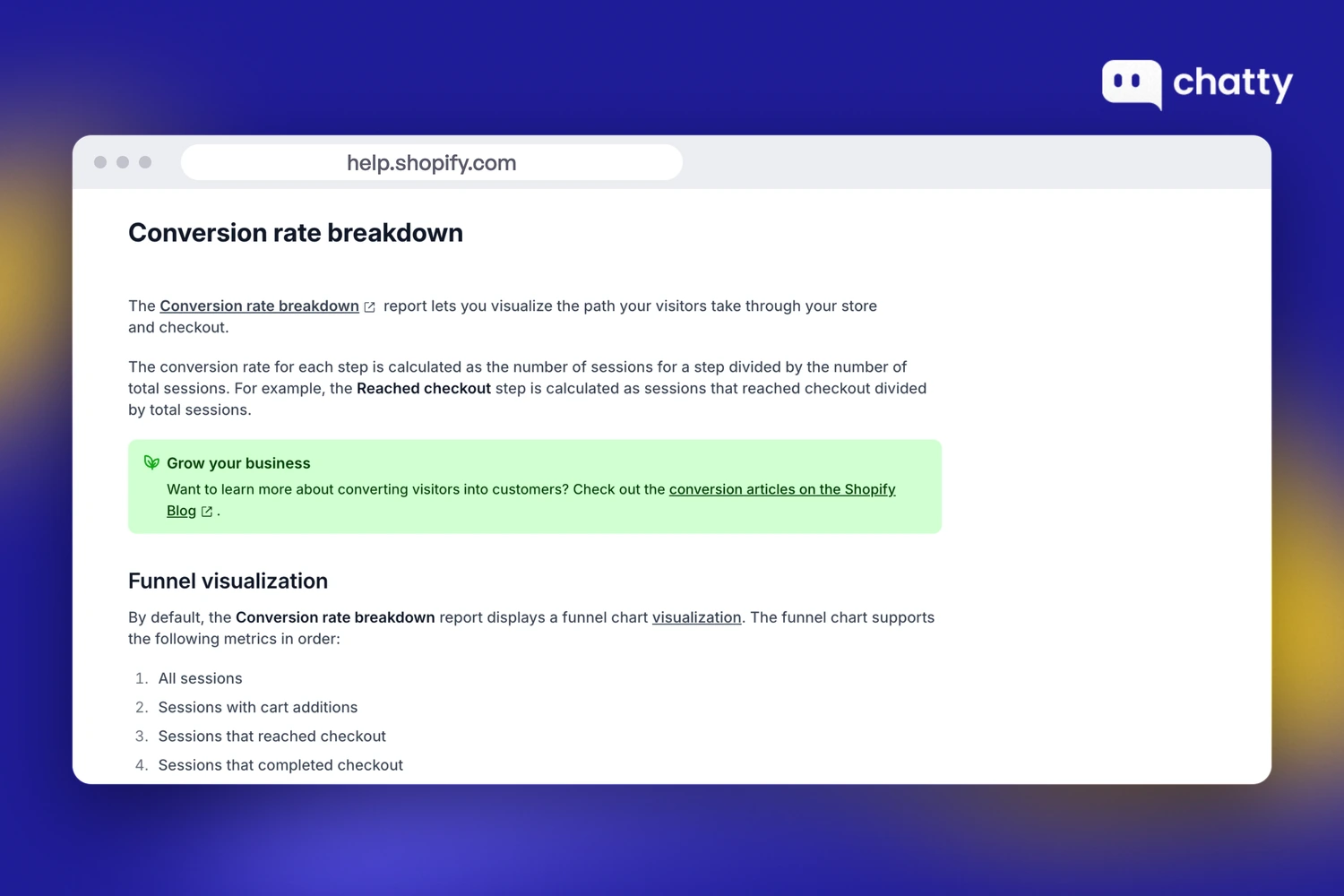
Read the gap between each pair of steps rather than the overall rate. A big drop before cart additions points at the landing page or the product page. A big drop after reached checkout points at checkout, and no product page app will fix that.
Use at least 30 days of data so one quiet week or one ad burst doesn't skew the steps. Compare mobile with desktop too, because the same step can leak on one device only.
Trade-off: the report tells you where shoppers leave, but not why and not which traffic source they came from. If you'd rather start from four store numbers, the other route is to pick apps by weak number.
Google Analytics 4: split the drop by source and landing page
Google Analytics 4 is best for stores that buy traffic from more than one channel. Google Analytics is free of charge, and you connect it through the Google & YouTube app on the Shopify App Store.
Shopify tells you which step leaks, while GA4 tells you which sessions leak there. Paid social and search can behave differently on the same step. Two ads that land on different pages can split the same way.
Build one funnel exploration in GA4 from four events: view item, add to cart, begin checkout and purchase. The Google & YouTube app sends all four, according to Shopify's GA4 guide. Then break it down by session source and by landing page.
When one source leaks, a new page tool won't fix it, because the traffic is part of the problem.
Trade-off: GA4 and Shopify count sessions their own way, so the totals rarely match. Don't spend time reconciling them. Keep Shopify as your source for conversion rate and use GA4 only for the split.
Once you know the step and the traffic behind it, you still need to see why shoppers stop there.
Which Shopify conversion rate optimization tools help explain exits?
Microsoft Clarity, Hotjar and Lucky Orange explain exits: where a shopper leaves the flagged step, and why. Recordings, heatmaps and surveys show that reason, which no funnel report can. You need one of the three tools, and the free one is enough for most stores.
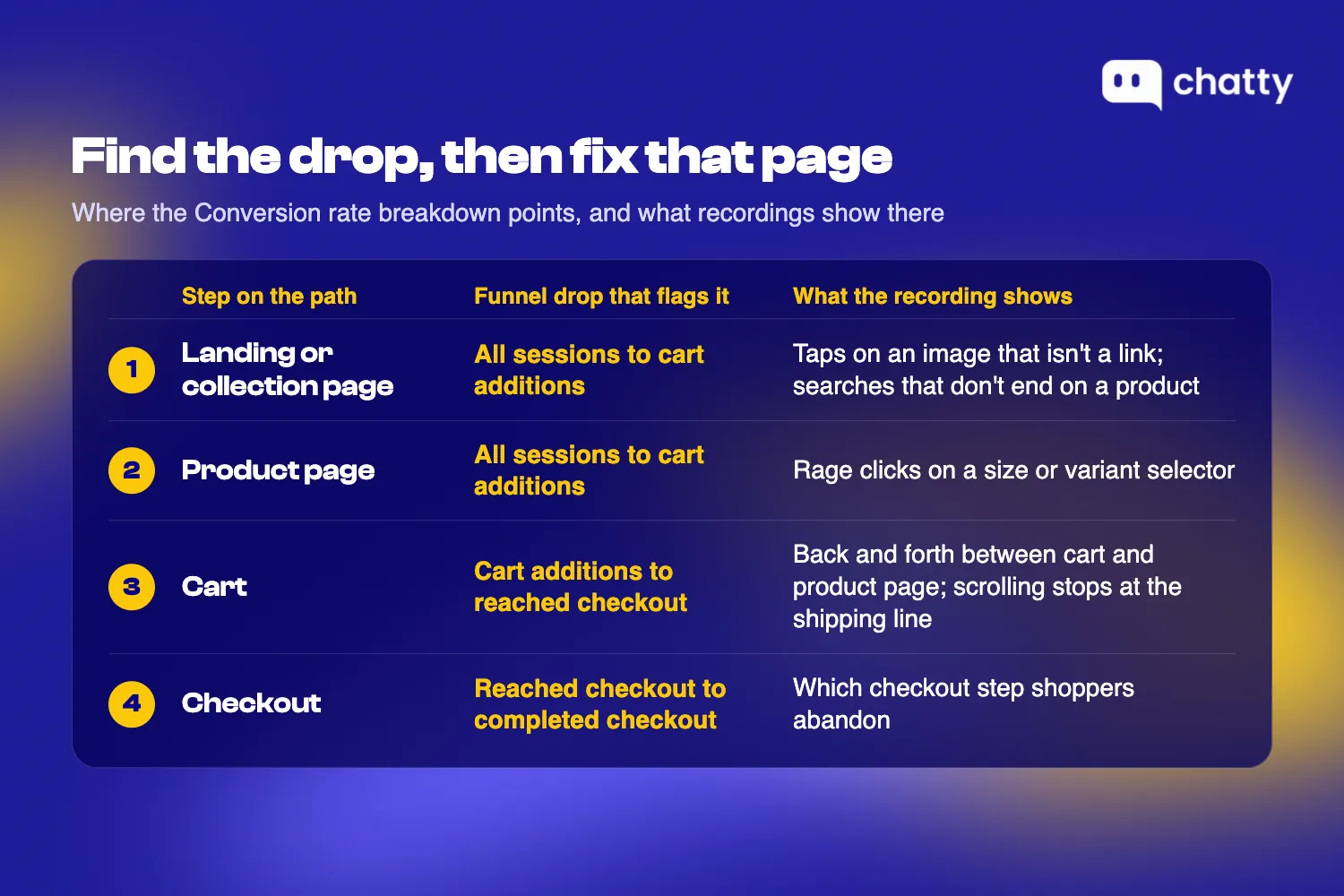
Watch a batch of recordings from the leaking step before you change anything. Four signals tell you where the friction sits:
- Rage clicks on a size or variant selector that doesn't respond the way shoppers expect.
- Taps on a product image that isn't a link and doesn't zoom.
- Scrolling that stops at the shipping line, followed by an exit.
- Back and forth between cart and product page, which usually means a question the page didn't answer.
Three tools record these signals. Start with the free one and switch only when you need something it lacks.
Microsoft Clarity: free recordings and heatmaps
Microsoft Clarity is best for stores that want recordings and heatmaps at no cost, at any traffic level. Microsoft Clarity calls itself free forever with no limits on traffic. Its Shopify App Store listing has a 4.6 rating from 2,437 reviews.
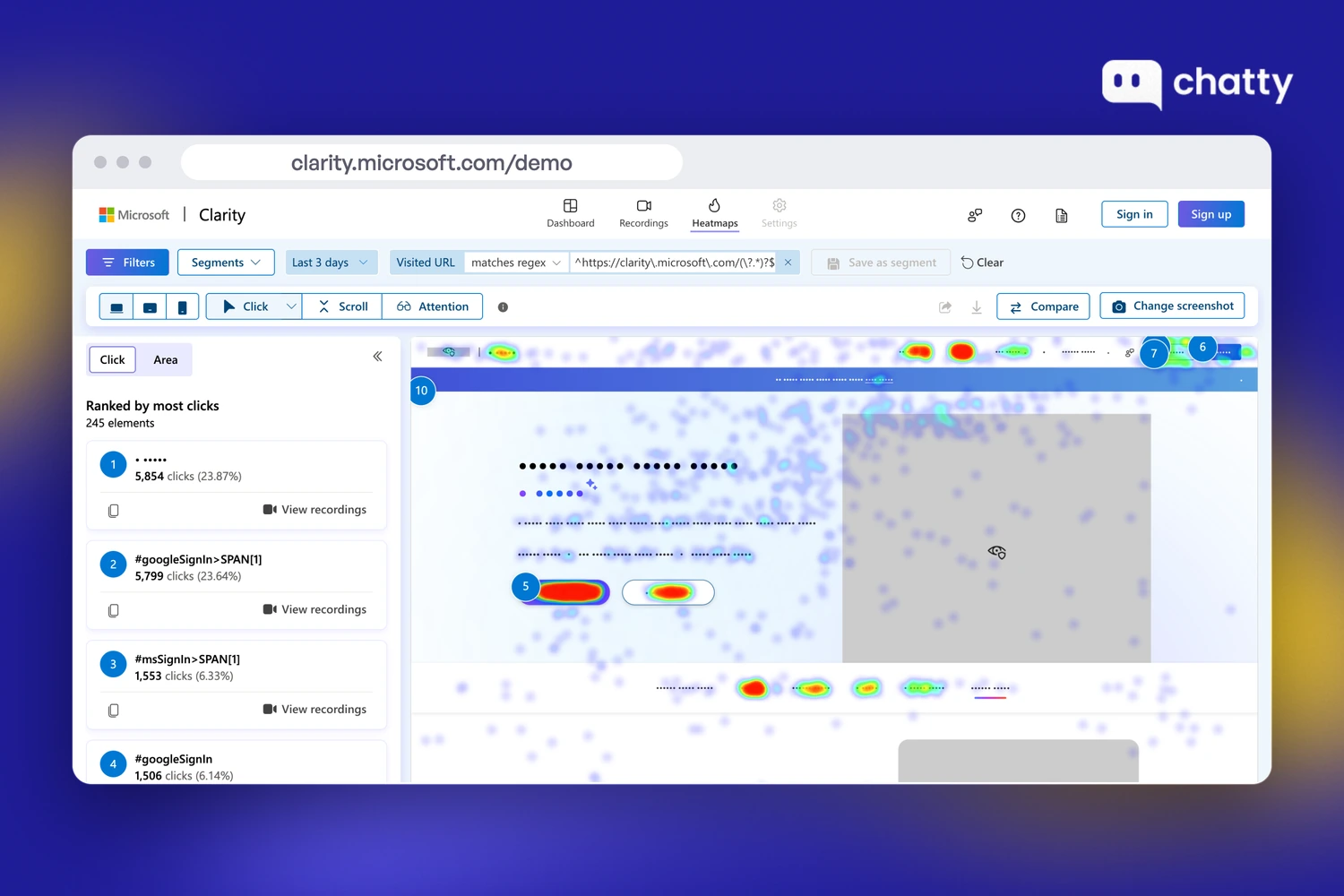
Clarity flags rage clicks and dead clicks for you, so you don't have to watch every session to find the problem. Filter recordings to the page behind your weakest funnel step, then sort by rage clicks first.
Heatmaps add the page-wide view. If most taps land on an image or a size chart link, that's what shoppers are trying to learn.
Trade-off: Clarity keeps recordings for 30 days, according to the Clarity FAQ. Favorites and a random sample stay for up to 9 months. Mark the sessions that show the problem as favorites before they expire.
Checkout is the other limit. Microsoft's Shopify setup guide mentions checkout tracking for Shopify Plus accounts only. If your funnel flags checkout on another plan, look at Lucky Orange below.
Hotjar: when you also want to ask shoppers why
Hotjar is best for stores that want shoppers to explain the problem in their own words, while they're still on the page. On-site surveys are the reason to choose it over Clarity. A one-question survey on the leaking step can confirm what a recording only hints at.
Hotjar is now part of Contentsquare. Its pricing page lists a free plan and Growth at $49 a month, or $39 billed yearly. Trade-off: the free plan gives you 1 month of data access.
Install Hotjar with its own tracking code. The "Hotjar Install" app on the Shopify App Store comes from a developer called Dualsided, not from Hotjar.
Lucky Orange: checkout drop-off inside a Shopify app
Lucky Orange is best for stores whose funnel flags the cart or checkout and that want a Shopify app. Its listing promises to "track cart abandonment and checkout drop-off by product and step", alongside recordings, heatmaps and surveys. That breakdown tells you which products get abandoned and at which checkout step shoppers give up.
The Lucky Orange listing shows a 4.6 rating from 901 reviews. Trade-off: the free plan records 100 sessions a month, and Launch records 500 for $19. Both keep 30 days of data.
A busy store fills those caps fast, so point it at the pages behind the leaking step only.
With the leaking step and its reason in hand, you're ready to pick the one tool that fixes it.
Which Shopify conversion rate optimization tools help fix friction?
PageFly, Search & Discovery, Judge.me, Chatty, your theme's cart drawer and Checkout Blocks each fix friction on one step of the buying path. Friction is anything that stops a ready shopper, like a missing answer or a surprise cost. The path runs landing or collection page, product page, cart, checkout, and you fix only the flagged step.
Some friction needs no app at all, so check these fixes without new apps before you install anything below.
Six tools follow, one per step, in the order a shopper meets them.
Landing pages: PageFly
PageFly is best for stores whose ads need a landing page the theme can't build. A single product with its own offer is a typical case.
Builder costs $24 a month for 5 published pages or sections. The PageFly listing has a 4.9 rating from 5,918 reviews. Trade-off: the free plan publishes only 1 page or section, and A/B tests need Accelerate at $99 a month.
Match the page to the ad so the shopper lands on the product and offer they clicked. That gives them one less reason to leave.
Collection pages and search: Shopify Search & Discovery
Shopify Search & Discovery is best for catalogs where shoppers search and filter before they choose. Apparel in many sizes and parts with many fits are good examples.
The app is free and built by Shopify. It controls filters, synonyms and the order of search results.
Add synonyms for the words your shoppers type, such as "sneakers" for "trainers", and filters for the details they compare.
Trade-off: the Search & Discovery listing rates it 2.6 from 511 reviews. Try it on your own catalog and keep it only if more searches start ending on a product page.
Product page reviews: Judge.me
A product page has to settle two different doubts: whether the product is good, and whether it suits the shopper's own case. Reviews settle the first one.
Judge.me is best for product pages with few or no reviews. A product with five reviews has a 270% higher purchase likelihood than one with none. That finding comes from 2017 research by the Spiegel Research Center.
The Judge.me listing has a 5.0 rating from 49,150 reviews. Its Forever Free plan includes unlimited reviews with photos and videos. Awesome, at $15 a month, adds a Q&A widget and AI replies.
Trade-off: reviews arrive only after orders ship, so a new product starts at zero.
Product page questions: Chatty, the AI sales agent for Shopify
Chatty handles the second doubt: a question about the shopper's own case, like which size fits.
Chatty is the AI sales agent for Shopify stores. AI chatbot and live chat are two standout features of Chatty. The AI chatbot answers from your own Shopify data, and with live chat your team takes over from the AI and closes the sale.
92% of product answers were right on price, stock and details when we compared 300 real Chatty answers with each store's website in October 2026.
Chatty is the app we build, so weigh this section with that in mind.
Chatty is best for stores whose shoppers ask about fit, compatibility or which variant to choose. Chatty does three things a review can't:
- Recommends the right product or variant.
- Adds it to the shopper's real Shopify cart and sends the checkout link.
- Hands the chat to your team on paid plans, so a person can close the sale.
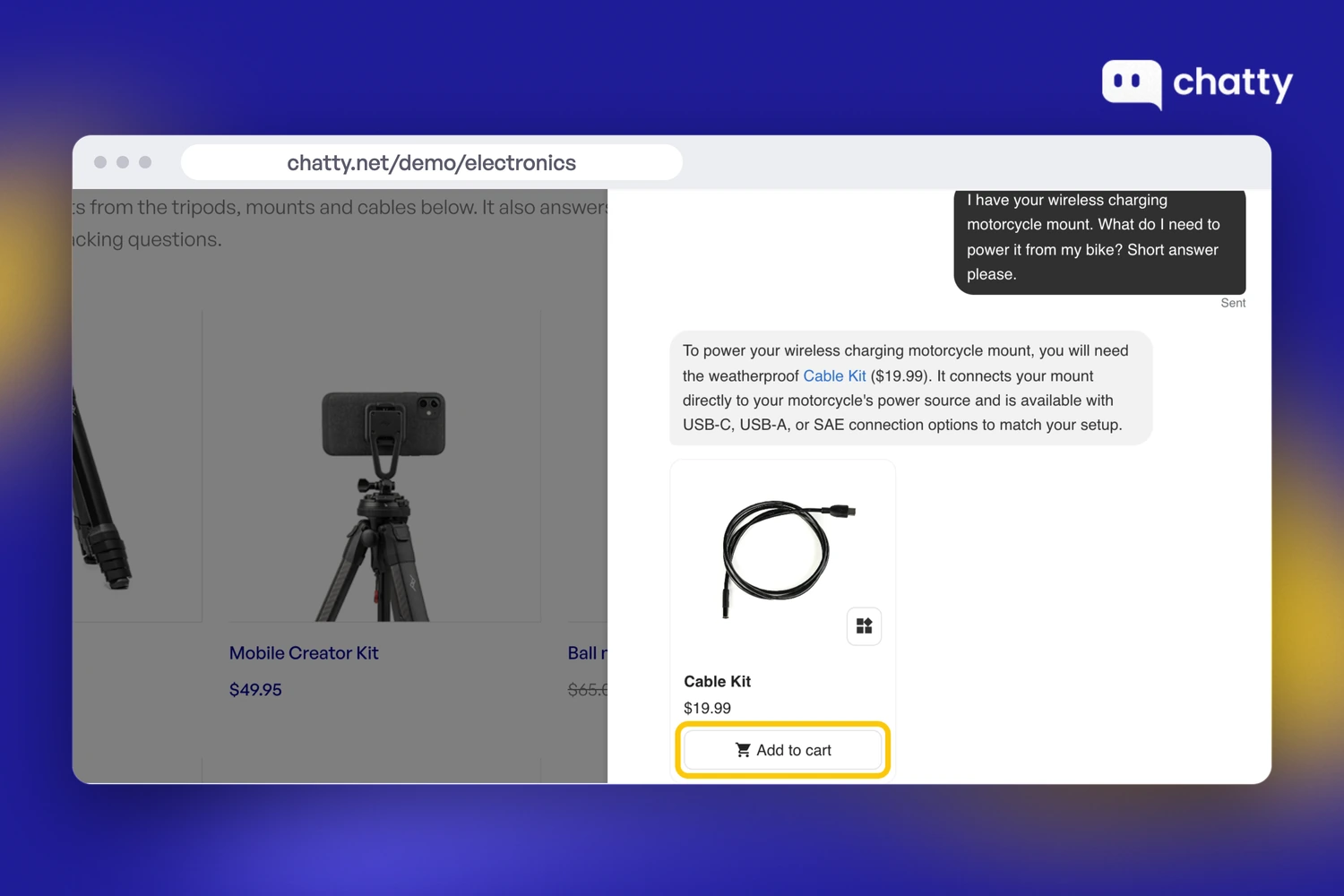
6,200+ stores have made sales with Chatty. Its Shopify App Store listing shows 4.9 from 1,892 reviews. Two single-store results, not averages:
- Just Nutritive: from February 5 to April 8, 2026, Chatty helped sell $150K of hair care across 2,912 orders. It recommended the right product and added it to the cart.
- Decathlon Réunion: in its first 7 days, Chatty recommended gear from a 10,000-product catalog and made €10,964 in assisted revenue. 9% of chats ended in a sale.
The Free plan has 50 AI conversations a month, then the AI pauses and your team answers by hand. Basic is $19.99 for 100, Pro $68.99 for 500 and Plus $199 for 1,000.
Your plan includes AI conversations, each extra one costs $0.40, and you set the monthly limit.
Chatty marks the orders it helped sell in Shopify, so you can check the return yourself.
Trade-off: Chatty works through the chat, so shoppers who doubt quality and never open it still need reviews. Not a fit if your team runs on SLA policies, macros and automation rules. The same goes if you need strong AI on Instagram, WhatsApp or email.
Install Chatty to try it on your product pages.
Pick Judge.me when shoppers doubt the product, and Chatty when they ask about their own case. Many stores need both.
Cart: your theme's cart drawer
Your theme's cart drawer is best for stores that send shoppers to a separate cart page after they add a product. A full cart page takes the shopper away from the product page. If that page is the first place your store shows shipping, the shopper meets the cost away from the product.
Check this before you install any cart app. In the theme editor, open Theme settings, then Cart. Set Cart type to Drawer or Popup notification, as Shopify's theme settings guide describes.
A drawer keeps the shopper on the product page.
Trade-off: Shopify warns that with a cart drawer or cart pop-up, "the Apple Pay button might not display" (Shopify Help Center). Test the drawer on a phone before you switch.
Checkout: the Shopify Checkout Blocks app
Shopify Checkout Blocks is best for stores that need one missing message or rule around checkout. A delivery note on the thank-you page is a common example.
Better checkout design can lift the average large ecommerce site's conversion rate by 35.26%, according to Baymard Institute.
Shopify runs the checkout itself, so start with the checkout settings in the no-app fixes guide above. The tool job here is small: add the message or rule that's missing, and know the plan limit.
The app is free, built by Shopify, and rated 4.1 from 220 reviews on its App Store listing. On every plan, it adds content blocks to the thank-you and order status pages. It also sets order value limits and address format rules.
Trade-off: custom fields and content blocks on the checkout itself are for Shopify Plus only. Hiding or reordering delivery and payment methods also needs Shopify Plus.
Every fix above is still a guess until the numbers move. So how do you know a fix worked?
Which Shopify conversion rate optimization tools help test fixes?
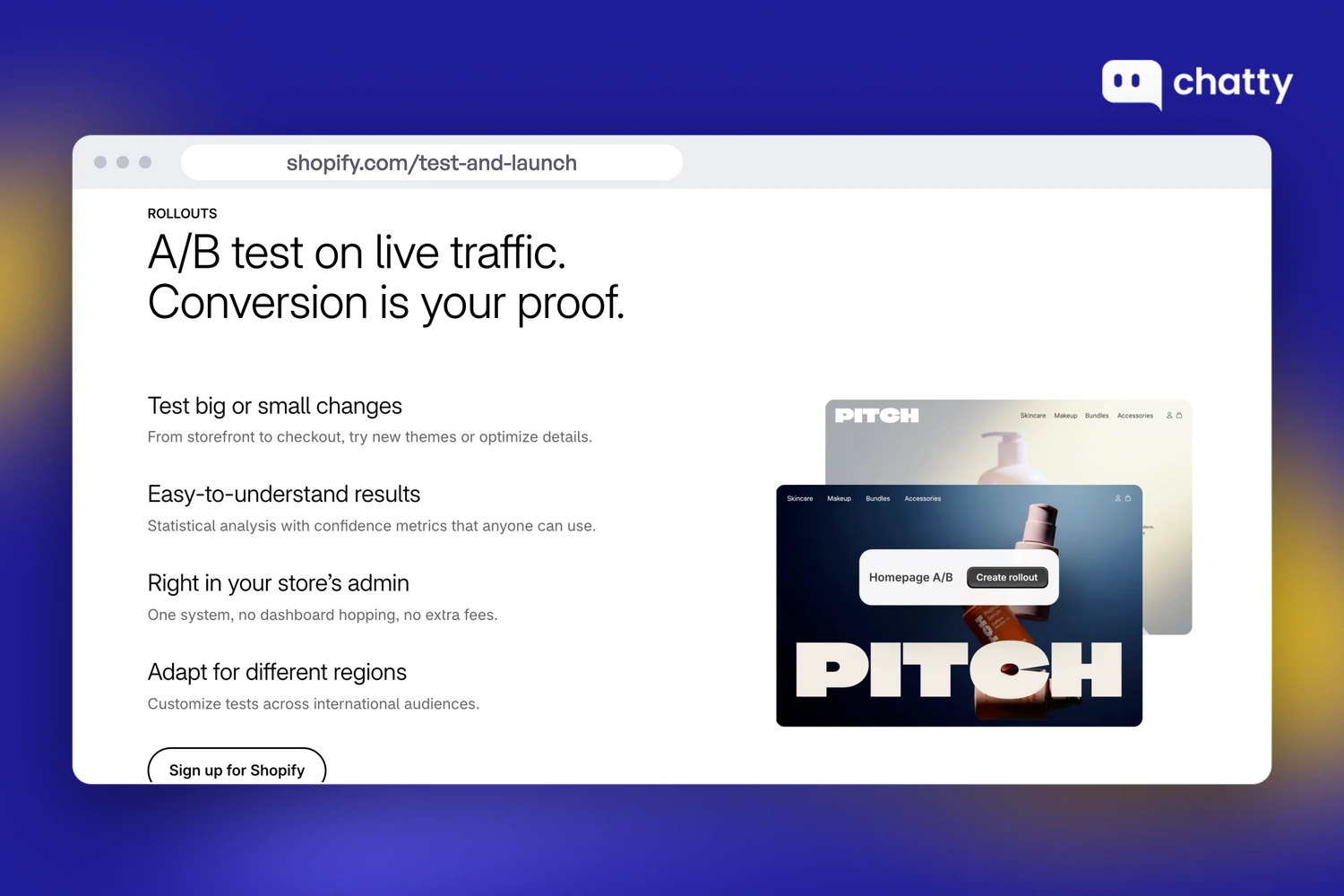
Shopify Rollouts, Shoplift and Intelligems test fixes, and they come last because a test can't find a fix. A test only checks whether the fix on your leaking step beats the old version. Rollouts runs experiments inside Shopify admin from the Grow plan, so start there before you pay for an app.
A test splits your shoppers between two versions, so each version gets only part of your traffic. A small store can wait a long time for a clear winner. If that's you, ship the fix and watch the funnel from the measure step, or try SimGym first.
Three testing tools fit Shopify, from built-in to paid.
Shopify Rollouts: A/B tests inside Shopify admin
Shopify Rollouts is best for stores on Grow or higher that want to test a theme or checkout change without another app. Rollouts are available on the Basic plan or higher, according to the Shopify Help Center. Experiments need the Grow plan or higher.
A rollout can include theme changes, checkout and customer accounts settings, discounts and catalog changes. That covers the fixes you make in the theme editor and in checkout settings.
Point each experiment at the one fix you made on the leaking step. A winner then tells you exactly which change to keep.
Trade-off: rollouts don't work on vintage themes, and they can't change Liquid templates.
For stores too small to split traffic, Shopify's test and launch page also offers SimGym. SimGym sends AI shoppers through your store and needs no store traffic minimum.
Shoplift: for stores that test templates and pages often
Shoplift is best for stores that test templates and pages most weeks inside the theme editor. Its price is based on site-wide monthly unique visitors.
The Shoplift listing rates it 4.9 from 134 reviews and prices Core at $99 a month. Core covers template, theme and URL tests, with mobile and desktop segments and a 14-day free trial. Trade-off: price testing needs the Advanced plan at $399 a month.
Intelligems: for price, shipping and offer tests
Intelligems is best for stores whose open question is about money: which price, shipping threshold or offer converts best. Its pricing scales with your store's order volume.
The Intelligems listing rates it 4.8 from 200 reviews and prices Smart Content at $69 a month. Smart Content tests landing pages, themes and content, with a 14-day free trial. Trade-off: discount and free shipping threshold tests start at $112.10 a month, and Unlimited costs $349.
Measure, watch, fix and test only pay off in that order, so start the week with step one.
How to install Shopify conversion rate optimization tools in order?
Shopify Analytics comes first, then a recording tool, then one fix, then a test. That's the order of the work: measure, watch, fix, test, applied to the step where your store leaks. Install a tool only when the step before it has told you what to do next.
The work for this week runs in five steps:
- Read your Conversion rate breakdown and find the pair of steps with the biggest drop.
- Split that step by source and landing page in GA4.
- Watch that page in Clarity until the same signal repeats.
- Fix the step with exactly one tool from the fix section.
- Test the fix in Rollouts once your traffic can show a winner.
You can start at $0 with Shopify Analytics, GA4, Microsoft Clarity, the Judge.me free plan, your theme's cart drawer and Checkout Blocks. Tools that sit on steps that don't leak won't improve online sales, however good their reviews are. Each month one sits there, you pay for it and the leak stays where it was.
For tactics beyond tools, our conversion rate guide covers the wider playbook. Start with the step your funnel flags, and let that step pick your next tool.
Frequently asked questions
Yes: Shopify Analytics and GA4 find where shoppers drop, and Microsoft Clarity shows why. Fix that step with one tool, such as PageFly, Judge.me or Checkout Blocks, then test it in Shopify Rollouts. On product pages, Chatty, the AI sales agent for Shopify, answers shoppers' questions.
Optimize in the order of the work. Find the step where shoppers drop in Shopify Analytics, then watch recordings of that step. Fix it with free store settings or one app, and test the fix only once your traffic can show a clear winner.
Shopify Analytics together with Microsoft Clarity. Shopify Analytics comes with every plan and shows which funnel step loses shoppers. Clarity is free and shows recordings and heatmaps of that step, so you can see why shoppers leave before you buy anything.
Not at first: Shopify Rollouts runs A/B experiments inside admin on the Grow plan or higher. Pay for an app such as Shoplift or Intelligems only when you test prices and offers. Running tests most weeks is the other reason to pay.
Use the free tools first: Shopify Analytics and Clarity show which step leaks, and many fixes are store settings. Shopify conversion rate optimization services make sense once you have traffic for regular tests. They help most when you lack the time to plan and run them.
Run one app for each job you're working on right now. Storefront apps add code to your store, so remove a recording tool or test app once its job is done. Keep only the tools tied to a step that still leaks.